Real tools, each built to fix one thing.
Every app on the desk started as a problem we kept hitting. They run on your computer with the AI you already have, and you shape them to fit the way you work. Desk comes two ways:
Desk apps
Full-window tools for your own files and work: read a folder of documents, write a resume, add apps from the marketplace.
📖 Reader · 📄 Resume Writer · 🧩 the marketplace
You need: a browser. Resume Writer works as it is; Reader and your coding agent need PriorStates Hub.
Open DeskDesk for Chrome
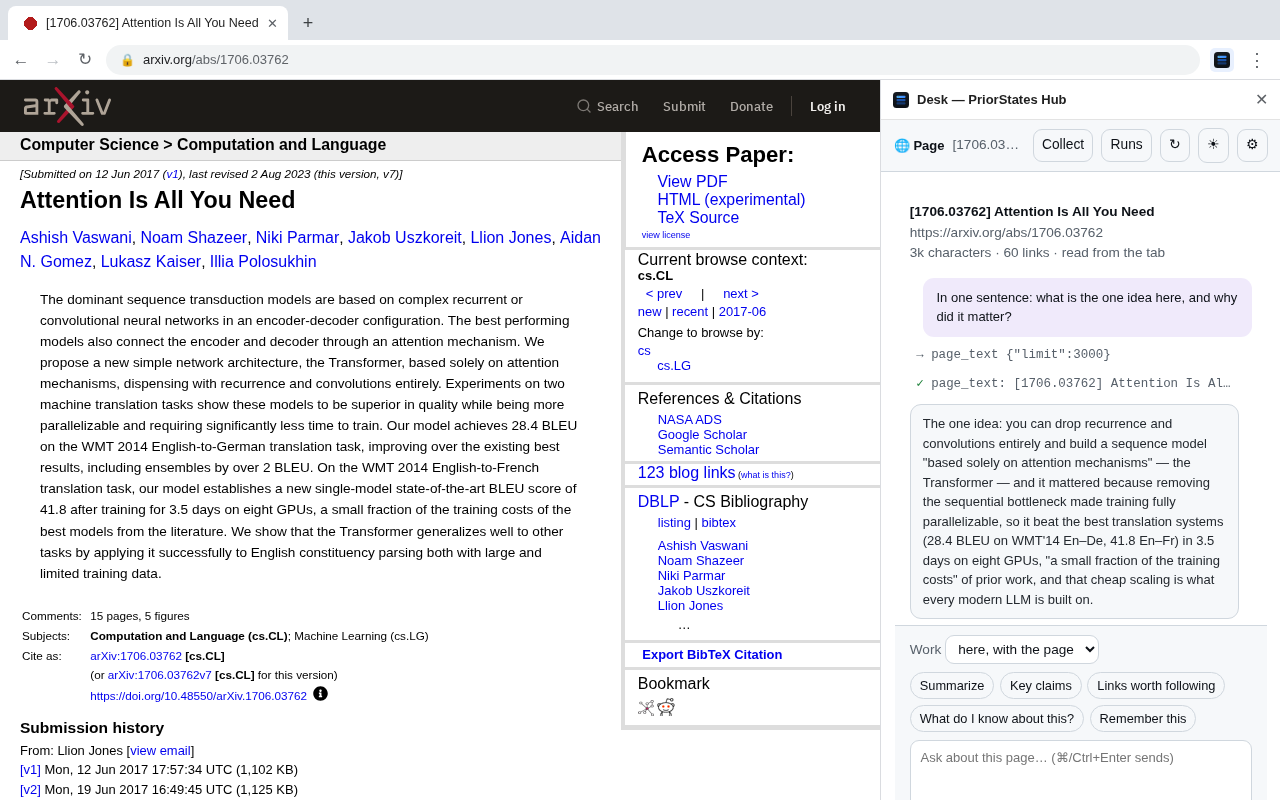
Your own coding agent in Chrome's side panel, next to whatever you are reading: ask about it, keep it, or edit your Google Doc.
🌐 Ask · 📥 Shelf · 📝 Docs
You need: Chrome, PriorStates Hub and the Desk extension; answers come from a coding agent on your computer.
Get Desk for ChromeDesk apps
Open Desk and an app takes the window. Each one was built to fix a problem we had: in our words, then what it does about it.
Reader
IDEs render markdown badly, and make you click through to a preview, file by file, while AI writes markdown all day. A viewer where every file in a folder is already the document: markdown, code, notebooks, PDFs, Office files, on your computer or over ssh. Needs PriorStates Hub. More →
Resume Writer
AI writes a nice-looking resume, but it doesn't work well for interviews. Write it yourself in plain text, keep every version, let the AI refine and render it, with your facts checked first. Works without the hub, with a Google AI Studio key. More →
The marketplace
One tool rarely fits everyone the same way. More apps from publishers who keep their code. Install one into Desk, then shape how it looks; Desk writes down what an app cannot express yet, so its publisher learns what to add. Browse →
Desk for Chrome
A side panel beside the page you are on, with its apps as tabs. Everything runs on your computer through PriorStates Hub: the extension has no server, and what it reads stays on your computer. Ask reads the page in front while it is the tab you are looking at (you can turn that off).
Ask
Reading on the web, and wanting your own agent there. Answers from the page and from the web with sources, remembers what you tell it to, and keeps the conversation as you move from page to page.
Shelf also in its own tab
What we kept from the web ended up scattered across downloads, bookmarks and notes. Drag links, images and text onto a folder of your own, or save the page as a note, as HTML or as a complete page. PDFs and other documents are kept as the files themselves.
What Desk gives every app
Shaped to fit
Say how an app should look ("serif headings, tighter lines, dates on the right") and the assistant edits the app's declared style, never its code. See it on the real thing, keep it, undo it, or reset. How shaping works
On your computer
With PriorStates Hub the apps run on your machine: your folders, your Python, and the coding agent you already have as the assistant. No key, no pairing, nothing sent to us. Apps, and the hub
Yours, not cloned
Apps come from a marketplace where publishers keep their code. You customize the surface an app declares, in a tab or in the side panel alike. Marketplace