
Ask once. Your apps do the work.
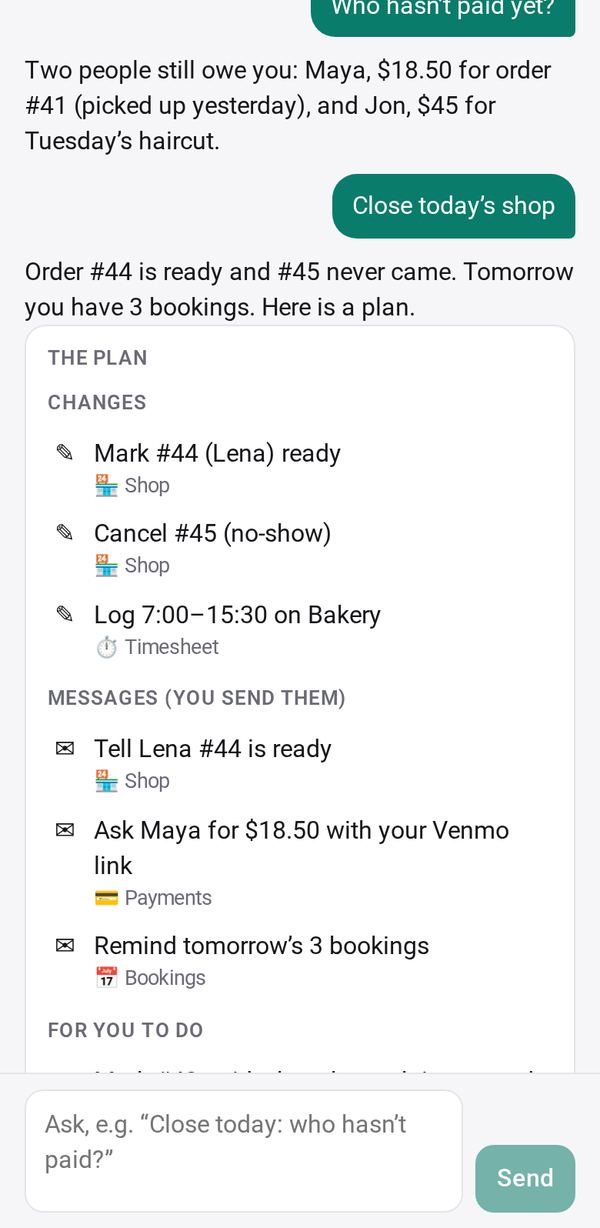
The Assistant works across your apps. Say what you need in your own words, like “close today: who hasn’t paid?”. It shows you a plan, and nothing changes until you tap Do it.
See it work
A narrated demo (50 s): a bakery closes its day by asking the Assistant.
How it works
- Ask in your own words“Who hasn’t paid yet?” “Close today’s shop.” “Remind tomorrow’s bookings.” It reads what it needs from your apps.
- See the planOne card with every change, every message for you to send, and what is left for you to do, each with the app it belongs to.
- Tap Do itYour apps make the changes. Every change has Undo, and the messages come back ready for you to send.
You stay in charge
Works with your apps
Today: Shop, Payments, Bookings and Timesheet, the apps that close a small business’s day. More apps learn it as they are updated.
From the AI app you already use
Use your Studio apps from your own AI chat app, on your own subscription, with the same rules: it reads after you allow it, and changes come to Studio as a plan for you to confirm.
- In the Assistant, open ⋯ → Use from your AI app.
- Add the connector to your AI app: https://priorstates.com/mcp/studio
- Type the code Studio shows. It works once, for 10 minutes.
Your requests pass through PriorStates’ relay in memory only: nothing of them is kept or logged. Studio answers while it is open.
Where it runs
In PriorStates Studio on your phone and on the web, with your own AI key or a paired computer. The free starter AI does not run it. Studio on a computer runs it in a coming release.