
Bill Calendar
Every bill on one calendar: what's due in the next 30 days, mark it paid, and a reminder before each one
- 💰 Money
- Just for you
- Version 1
- Free · no account
What it does
- Add rent, power, phone and the rest from common types, a photo of a bill or a pasted email
- See what is due in the next 30 days and this month, and mark bills paid
- Bills that vary learn their usual amount, and a reminder comes before each one, with no bank login
How to start
- Open Studio on your phone, on the web or on your computer, and tap Gallery (or the Find an App tile).
- Find Bill Calendar under Money, and tap Add.
Try it with example data (in your browser, nothing is kept) · Open it in Studio on the web
Using it needs no AI. New to Studio? Get started.
Main tasks
Add your bills
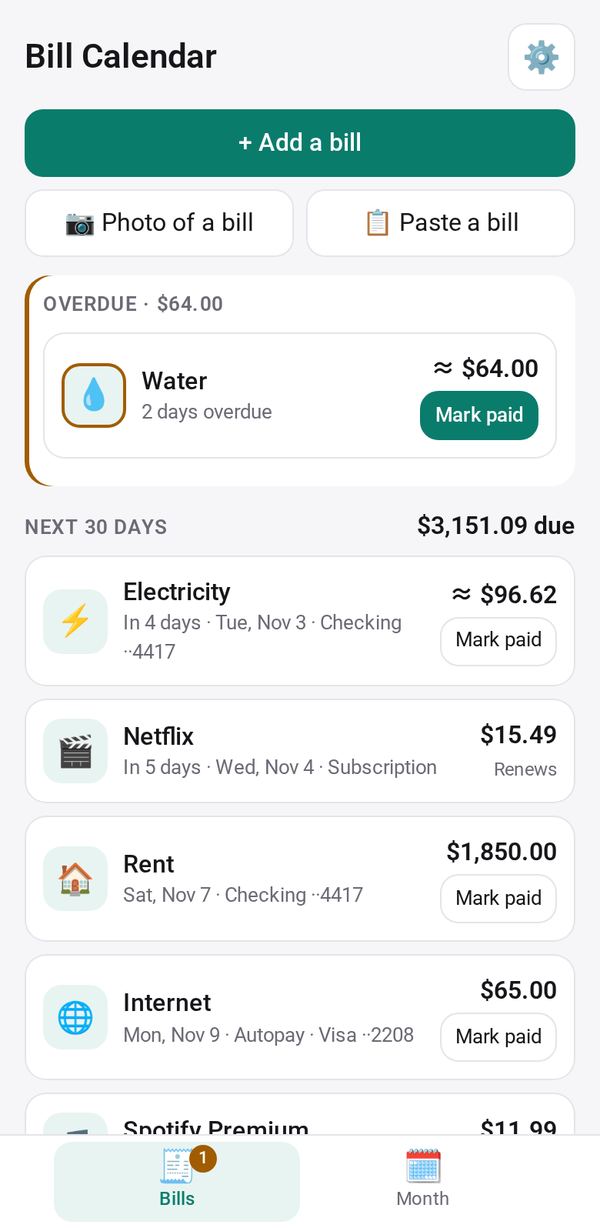
Tap "+ Add a bill" and pick a common type such as rent or power, or use "📷 Photo of a bill" or "📋 Paste a bill" to fill in the payee, amount and due date. Check it and tap Save.
Mark a bill paid
Tap "✓ Paid" on a bill. A fixed bill is paid in one tap; a bill that varies asks for the amount, and learns its usual amount from your last payments.
See what is due
The Bills tab shows anything overdue first, then the next 30 days with the total still due. Subscriptions' renewals can show here too after you tap Allow.
Plan the month
Open the Month tab to see the month's bills, what is paid and left to pay, the bill-free days and, if you enter your income, what is left after bills.
Export your bills
Save your bills or your payments as a CSV file.
Make it yours
Ask Studio: “Show which account pays each bill”
Hold the app and tap Edit with AI, then say what to change in plain words. Every version is kept in History. How to ask well.
In these ready-made spaces
- 💵 Household money (You and your family)