
Docs › Studio › For your business
Take orders by link
Send one link. Customers order in their browser, with nothing to install, and the orders arrive on your phone.
Which app
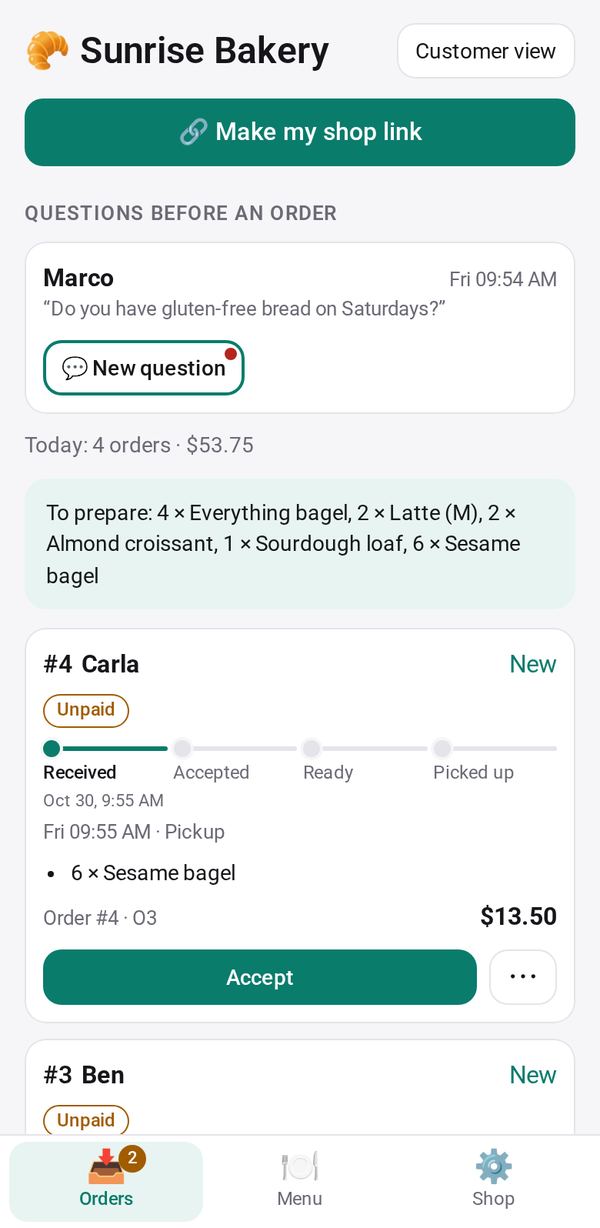
- Shop: a menu that is always open, for a café, a bakery or a food stall. Orders go New → Accept → Ready → Picked up.
- Order Form: one round at a time, for a farm box, a weekly bake or a pre-order. Send this week's list, collect orders until you close it, then pack.
- Group Order: a buying club, where members order together and each sees their share.
Set up Shop
- In the Menu tab, tap + Item for each item with a price, a photo, sizes and dietary marks. Or tap 📷 Menu from a photo to read a printed menu (this step uses the AI; check the result).
- In the Shop tab, tap Use my business profile for your name, hours and how people pay.
- In Orders, tap 🔗 Make my shop link, then Send it to your customers, put it on your Business Page, or print its QR code.
Handle the orders
- Each order arrives as New. Tap Accept.
- When it is ready, tap Ready: tell them. A text to the customer opens on your phone, ready to send, and their order page shows Ready.
- Mark it Picked up. To prepare adds up everything still open.
Want to hear about orders while Studio is closed? Turn on notifications.
What your customer sees
Your link opens in their browser: your menu, your hours and prices. They choose, give a name and phone, and send. Their page then shows the order's status as you move it along, the ways to pay you, I've paid, and 💬 Ask a question. Nobody needs an account or an app.