
Carpool
One link to share the driving: parents pick the runs they can drive, and you see which still need a driver
- 👥 Groups & events
- Send it to people
- Version 7
- Free · no account
What it does
- List the school or practice runs
- Parents claim the ones they can drive
- Drivers get a reminder the evening before
The people you send its link to open it in any browser, with nothing to install and no account. What they send comes back sealed, so only you can read it.
How to start
- Open Studio on your phone, on the web or on your computer, and tap Gallery (or the Find an App tile).
- Find Carpool under Groups & events, and tap Add.
Try it with example data (in your browser, nothing is kept) · Open it in Studio on the web
Using it needs no AI. New to Studio? Get started.
Main tasks
List the runs
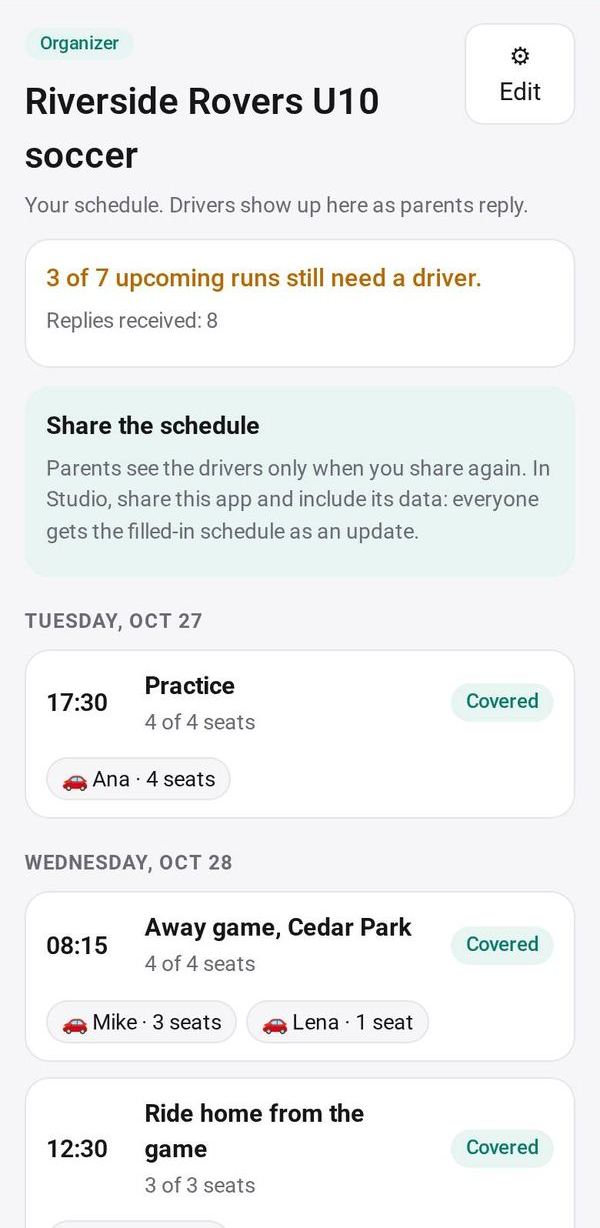
Make a carpool with each run's day, time, what it is and seats needed. "+ A school week" adds Monday to Friday school runs in one tap.
Send the link
Tap Send or Copy, or post it to a circle. Parents tap the runs they can drive, set their seats and send.
See what still needs a driver
Your page shows runs coming up, those covered, and those still needing a driver, with who drives each one.
Roll it to next week
Tap Next week to move the same runs on by a week, or Edit runs without losing the drivers.
Make it yours
Ask Studio: “Add Saturday soccer practice to the runs”
Hold the app and tap Edit with AI, then say what to change in plain words. Every version is kept in History. How to ask well.
In these ready-made spaces
- 🏫 School office (Your business)
- 🎒 Parents & school (You and your family)
- 🤝 Clubs & groups (Groups and work)