
Challenge Board
One link for a friendly challenge: people add their steps, books or km, and everyone sees the standings
- 👥 Groups & events
- Send it to people
- Version 6
- Free · no account
What it does
- Run a friendly challenge: steps, books, kilometres
- People send their entries from the link
- Everyone sees the standings
The people you send its link to open it in any browser, with nothing to install and no account. What they send comes back sealed, so only you can read it.
How to start
- Open Studio on your phone, on the web or on your computer, and tap Gallery (or the Find an App tile).
- Find Challenge Board under Groups & events, and tap Add.
Try it with example data (in your browser, nothing is kept) · Open it in Studio on the web
Using it needs no AI. New to Studio? Get started.
Main tasks
Set up the challenge
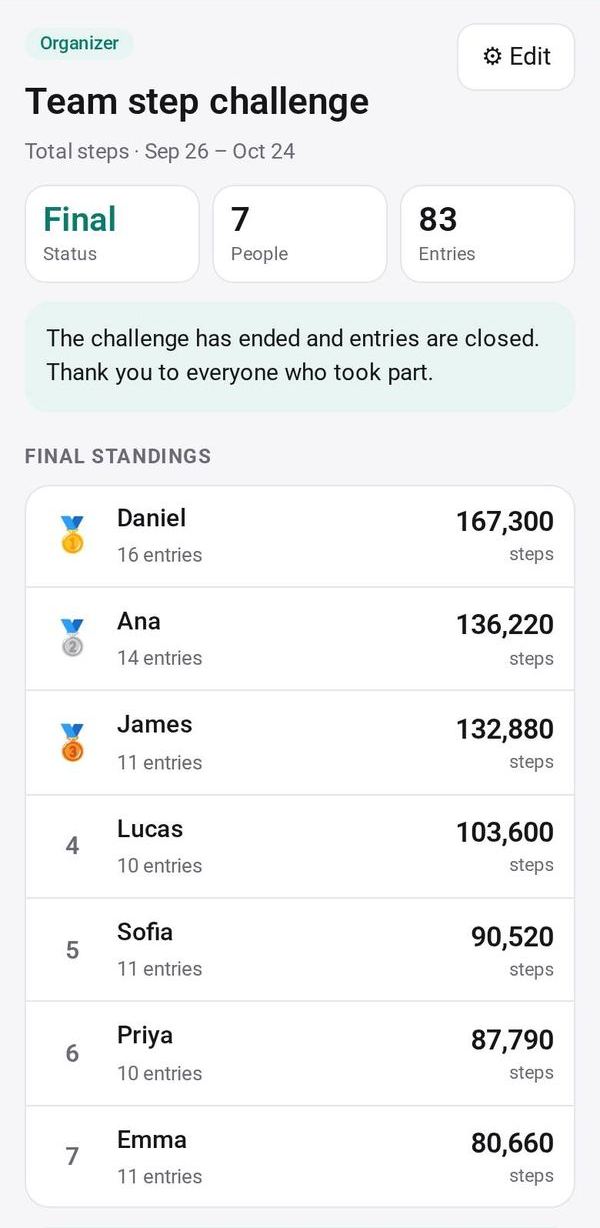
Give it a name and a unit such as steps, books or km, choose whether it counts the total or the best single entry, and set the start and end dates. "📷 Fill from a photo" can read a poster.
Send the link
Tap Send or Copy, or post it to a circle. People add their entries in their browser.
Join in yourself
Tap "Add my own entries" to open the challenge and add yours like everyone else.
Follow the standings
Everyone sees the standings, with 🥇🥈🥉 for the top three. You can remove a person if needed.
Run it again
When it ends, tap "Again next month" to start the same challenge for the next month.
Make it yours
Ask Studio: “Track pages read instead of steps”
Hold the app and tap Edit with AI, then say what to change in plain words. Every version is kept in History. How to ask well.
In these ready-made spaces
- 🎨 Hobbies (You and your family)
- 🤝 Clubs & groups (Groups and work)