
Collection
Catalogue what you collect from photos, and see what it is worth
- 🏠 Home & family
- Just for you
- Version 4
- Free · no account
What it does
- Snap an item to fill in its details
- Track what you paid against an estimated value
- Keep a wishlist
How to start
- Open Studio on your phone, on the web or on your computer, and tap Gallery (or the Find an App tile).
- Find Collection under Home & family, and tap Add.
Try it with example data (in your browser, nothing is kept) · Open it in Studio on the web
Using it needs no AI. New to Studio? Get started.
Main tasks
Add an item from a photo
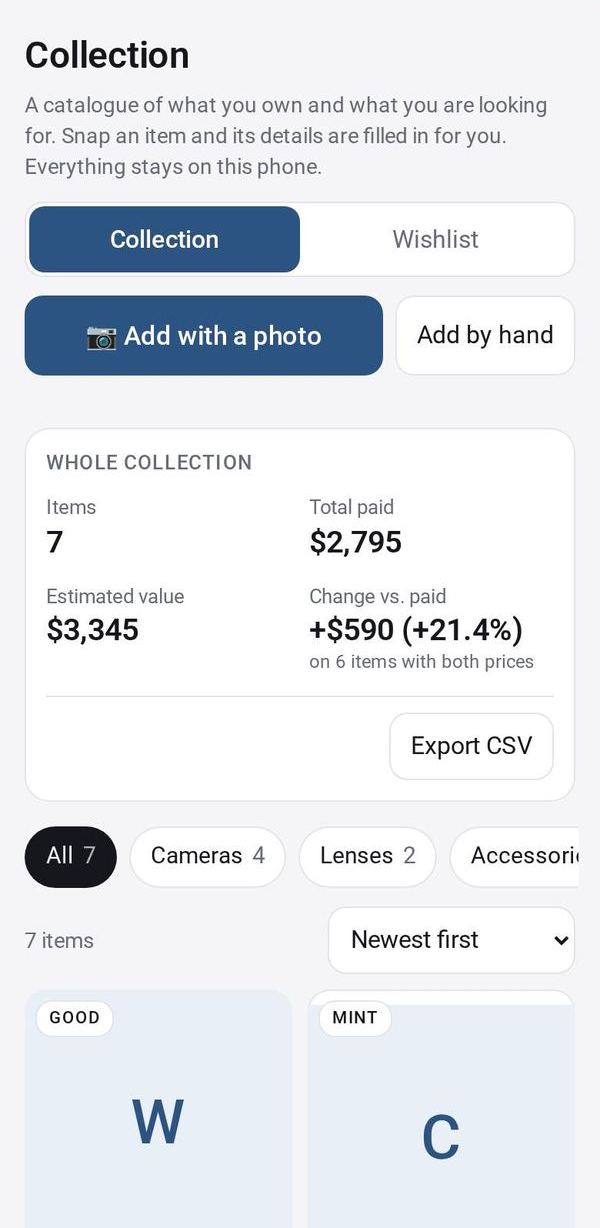
Tap "Add with a photo". The AI suggests the name, maker, year, category and an estimated value for you to check, then you save. "Add by hand" opens the same form empty.
Track paid against value
Enter what you paid and an estimated value. The Collection tab totals both for the category you are viewing.
Browse your collection
Tap a category chip and sort by newest, name or highest estimate. Tap a card to edit it.
Keep a wishlist
Add things you want, with a target price, in the Wishlist tab. When you get one, tap "Got it" to move it into your collection.
Export
Tap Export CSV to save your whole collection as a spreadsheet file.
Make it yours
Ask Studio: “Set it up for vinyl records, with pressing year”
Hold the app and tap Edit with AI, then say what to change in plain words. Every version is kept in History. How to ask well.
In these ready-made spaces
- 🎨 Hobbies (You and your family)