
Customer Offers
Make offers for your regulars, lapsed customers or fans of an item, keep a record of who agreed to texts, and text each one from your own phone
- 🏷️ Sell & side business
- Just for you
- Version 1
- Free · no account
What it does
- Offers for your regulars, customers you haven't seen in a while, or fans of one item
- A record of who agreed to get texts from you
- Text each offer one by one from your own phone
How to start
- Open Studio on your phone, on the web or on your computer, and tap Gallery (or the Find an App tile).
- Find Customer Offers under Sell & side business, and tap Add.
Try it with example data (in your browser, nothing is kept) · Open it in Studio on the web
Using it needs no AI. New to Studio? Get started.
Main tasks
Bring in your customers
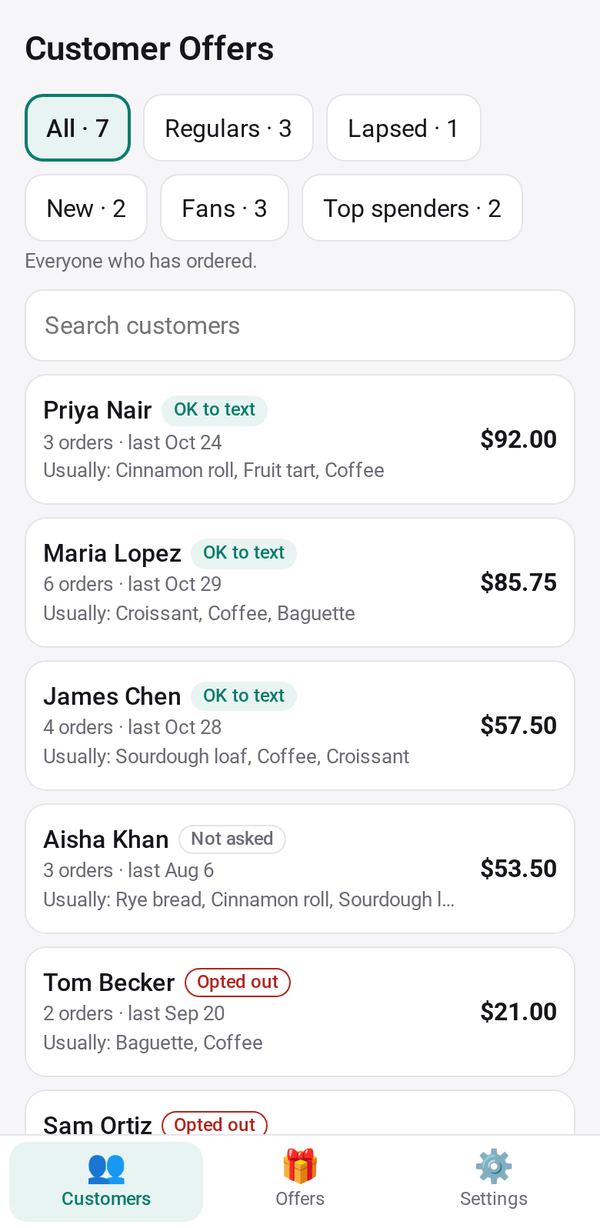
Tap Allow for each of your business apps, such as Shop, Phone Orders and Bookings. Customers are grouped as Regulars, Lapsed, New, Fans of an item and Top spenders.
Record who agreed to texts
Open a customer and choose how they agreed: on the phone, in person, in writing or online, or mark them Opted out. Only customers who said yes can be texted.
Make an offer
In Offers, tap "+ New offer" and enter a title, details, a code, a valid-until date and who it is for. A live preview shows the text.
Text it one by one
On the offer, tap Send, then "💬 Text" beside each customer to open your own messages app with the offer filled in. Every text ends with how to opt out.
See how it did
Each offer shows how many were sent, how many used it (tap "Mark used" when someone does) and the sales since.
Make it yours
Ask Studio: “Add a birthday offer for each customer's birthday month”
Hold the app and tap Edit with AI, then say what to change in plain words. Every version is kept in History. How to ask well.
In these ready-made spaces
- ☕ Café (Your business)