
Daily Log
Note how each day went in one line, and see your weeks on a mood calendar
- 🌱 Health & habits
- Just for you
- Version 2
- Free · no account
What it does
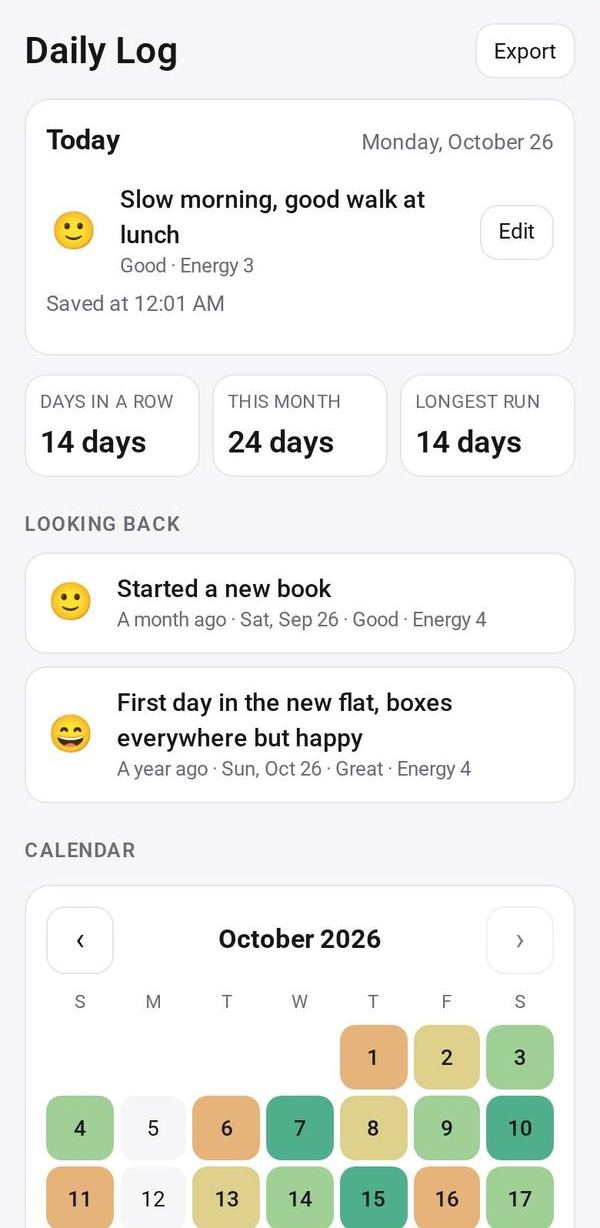
- One line a day: a face for your mood, your energy and a short note
- A calendar coloured by mood, and a look back at a month and a year ago
- Search your notes, export them as a spreadsheet file (CSV), and an optional daily reminder
How to start
- Open Studio on your phone, on the web or on your computer, and tap Gallery (or the Find an App tile).
- Find Daily Log under Health & habits, and tap Add.
Try it with example data (in your browser, nothing is kept) · Open it in Studio on the web
Using it needs no AI. New to Studio? Get started.
Main tasks
Log today
On Today's card, tap a face for your mood, an energy level if you like, and write a short note. Tap Save.
Fill in or change a day
Tap a day in the calendar to see it, edit it or add a day you missed.
Look back
See your days in a row, the month's mood colors and mix, and the same date a month and a year ago.
Search and export
Search your notes, or tap Export to save everything as a CSV file.
Set a reminder
Turn on the daily reminder and pick a time. It is skipped once you have logged the day.
Make it yours
Ask Studio: “Add how many hours I slept each night”
Hold the app and tap Edit with AI, then say what to change in plain words. Every version is kept in History. How to ask well.
In these ready-made spaces
- 💪 Health & habits (You and your family)
- 💼 At work (Groups and work)