
Delivery Route
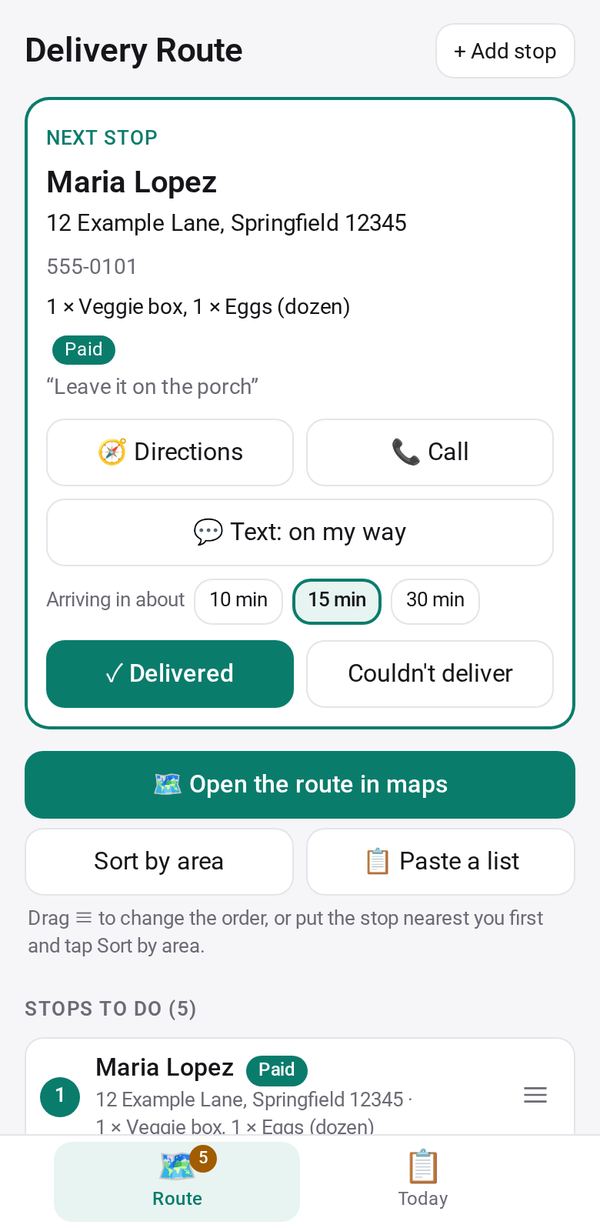
Your deliveries in order: take the day's delivery orders, open the route in your maps app, text each customer you're on the way, and mark each stop delivered
- 🏷️ Sell & side business
- Just for you
- Version 6
- Free · no account
What it does
- Take the day's delivery orders, paste a list of stops or take a photo of one
- Sort by area, reorder, and open the route in your maps app
- Text each customer you're on the way, and keep a proof-of-delivery photo on your phone
How to start
- Open Studio on your phone, on the web or on your computer, and tap Gallery (or the Find an App tile).
- Find Delivery Route under Sell & side business, and tap Add.
Try it with example data (in your browser, nothing is kept) · Open it in Studio on the web
Using it needs no AI. New to Studio? Get started.
Main tasks
Gather the day's stops
Tap "Add them to the route" to bring in delivery orders from Order Form, use "📋 Paste a list" or "📷 Fill from a photo", or tap "+ Add stop".
Put them in order
Tap Sort by area, starting from the stop nearest you, then drag the ≡ handle to fine-tune.
Drive the route
Tap "Open the route in maps" or Directions for one stop. "Text: on my way" sends the customer your arrival time from your own phone.
Mark a stop delivered
Tap Delivered, note cash paid at the door, pick where you left it and take a "📷 Photo at the door". Tap "Update Order Form" so customers see it was delivered.
Close the day
The Today tab shows deliveries done, cash collected and what is still due. Enter the distance, log it in Mileage Log, then tap "Start a new day".
Make it yours
Ask Studio: “Add a column for the gate code at each stop”
Hold the app and tap Edit with AI, then say what to change in plain words. Every version is kept in History. How to ask well.
In these ready-made spaces
- 🧺 Farm & market (Your business)