
Grocery Run
Know what to buy before each grocery trip: it learns your routine items and how often you buy them from your receipts, one list per store
- 🏠 Home & family
- Just for you
- Version 1
- Free · no account
What it does
- Learns what your household buys and how often, from your receipts: a photo, a screenshot or pasted text
- On each store's shopping day, a list of what you likely need, with an estimated total
- One list per store, and the family can add to it
How to start
- Open Studio on your phone, on the web or on your computer, and tap Gallery (or the Find an App tile).
- Find Grocery Run under Home & family, and tap Add.
Try it with example data (in your browser, nothing is kept) · Open it in Studio on the web
Using it needs no AI. New to Studio? Get started.
Main tasks
Add your receipts
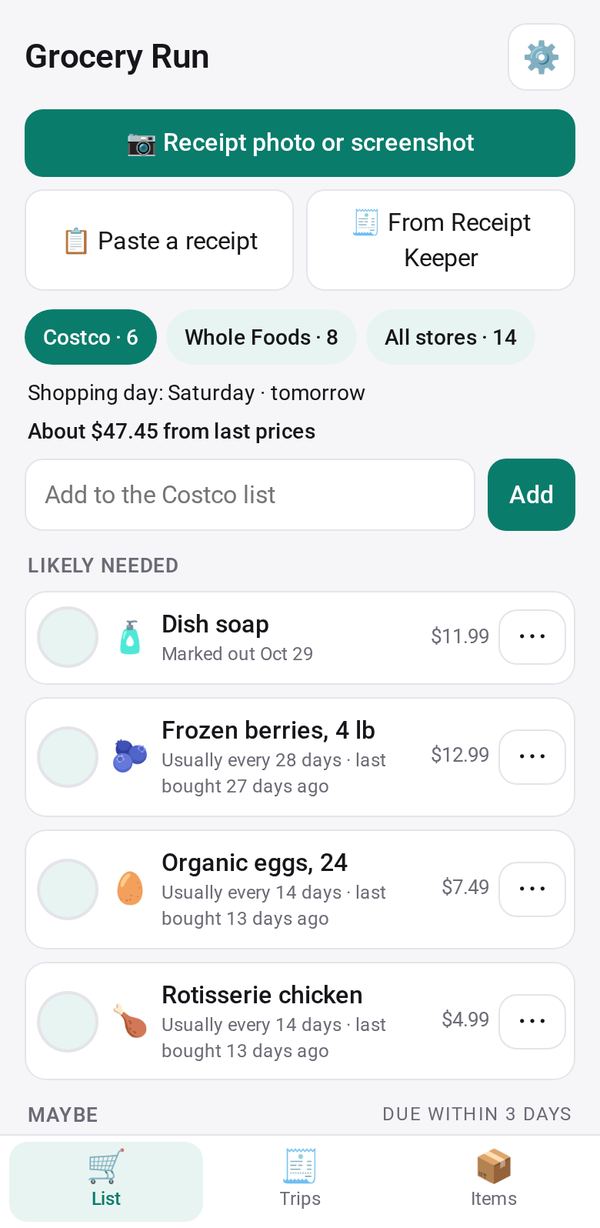
Tap 📷 for a photo or screenshot of a receipt, 📋 to paste text, or 🧾 From Receipt Keeper. Check the lines and tap Save; the app learns what you buy and how often.
Set your stores and shopping days
In ⚙, add each store and its shopping day. A reminder that day names what you likely need.
Shop from the list
Pick a store in the List tab to see Likely needed, Maybe, Every trip and Added, with an estimated total. Tick items off, and tap "✓ Finish trip" when done.
Correct a suggestion
Use ⋯ on an item: Still have some, Out now, Every trip, or Stop suggesting.
Let the family add items
Turn on the family list in ⚙ and share the link. Family members add items and tick Got it from their phones.
Make it yours
Ask Studio: “Remind me on Saturday mornings, not Friday evenings”
Hold the app and tap Edit with AI, then say what to change in plain words. Every version is kept in History. How to ask well.
In these ready-made spaces
- 🏡 Home & family (You and your family)
- 💵 Household money (You and your family)