
Hobby Log
Log every hobby in two taps or with a timer, follow projects with before-and-after photos, and watch your streaks, weekly goals and milestones grow
- 📚 Learning & people
- Just for you
- Version 1
- Free · no account
What it does
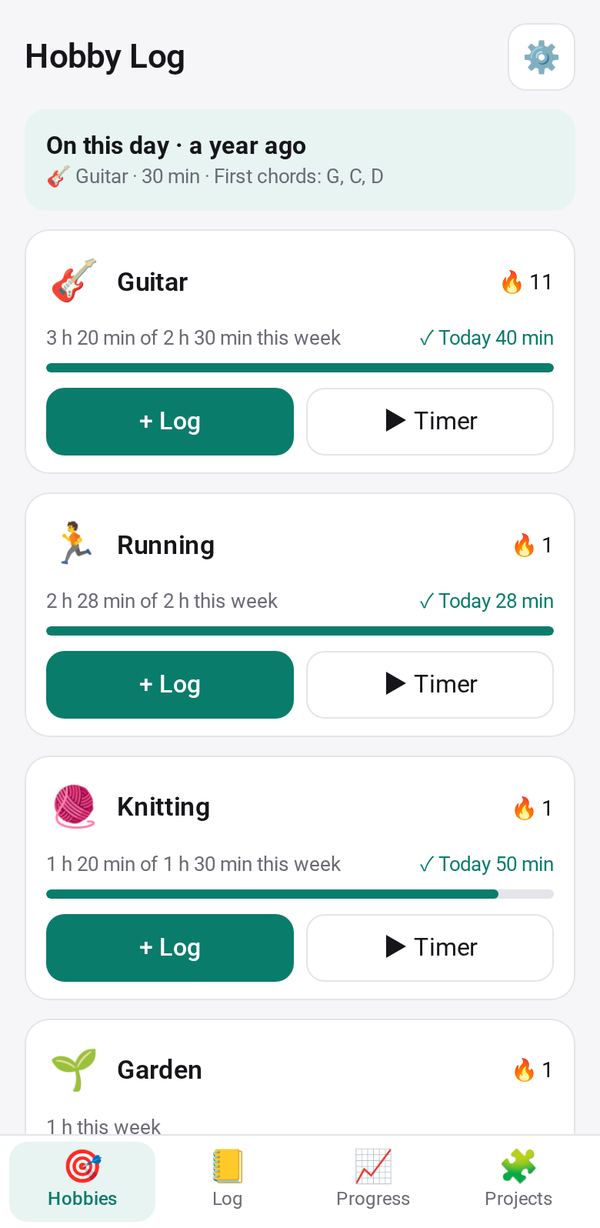
- Log a session in two taps or with a timer, each hobby with its own fields: pieces practised, distance, catch or materials
- Follow projects stage by stage, from a song to a sweater, with before-and-after photos
- See your streaks, weekly goals, milestones and a look back on this day; everything stays on your phone
How to start
- Open Studio on your phone, on the web or on your computer, and tap Gallery (or the Find an App tile).
- Find Hobby Log under Learning & people, and tap Add.
Try it with example data (in your browser, nothing is kept) · Open it in Studio on the web
Using it needs no AI. New to Studio? Get started.
Main tasks
Set up your hobbies
Add a hobby from a template such as guitar, running, knitting or fishing. Each comes with its own fields, a weekly goal in minutes and optional reminders on the days you choose.
Log a session
On the Hobbies tab, tap "+ Log" and pick the minutes to save in one tap, or More details for the full form. Or use "▶ Timer" and "■ Stop"; the timer keeps running while the app is closed.
Follow a project
In Projects, start a project with its stages, tap Next stage as you go, and add progress photos. Share picture makes one image of the first, middle and latest photos.
See your progress
The Progress tab shows days in a row, weeks at your goal, minutes per week, this year's totals and your milestones.
Bring in a paper log
In the Log tab, tap "📷 Read a paper log", tick the rows you want and tap Add. Export your sessions as CSV.
Make it yours
Ask Studio: “Add a field to a hobby, like the songs you played or the kilometres you ran”
Hold the app and tap Edit with AI, then say what to change in plain words. Every version is kept in History. How to ask well.
In these ready-made spaces
- 💪 Health & habits (You and your family)
- 🎨 Hobbies (You and your family)