
Job Tracker
Paste a job posting and the AI fills it in; track each job from saved to offer and follow up on time
- 🛠️ Work
- Just for you
- Version 1
- Free · no account
What it does
- Paste a job posting or a screenshot, and the AI fills in the details
- Move each job from saved to applied, interviewing and offer
- Follow up on time with a message ready to send, and see your week against a goal
How to start
- Open Studio on your phone, on the web or on your computer, and tap Gallery (or the Find an App tile).
- Find Job Tracker under Work, and tap Add.
Try it with example data (in your browser, nothing is kept) · Open it in Studio on the web
Using it needs no AI. New to Studio? Get started.
Main tasks
Add a job
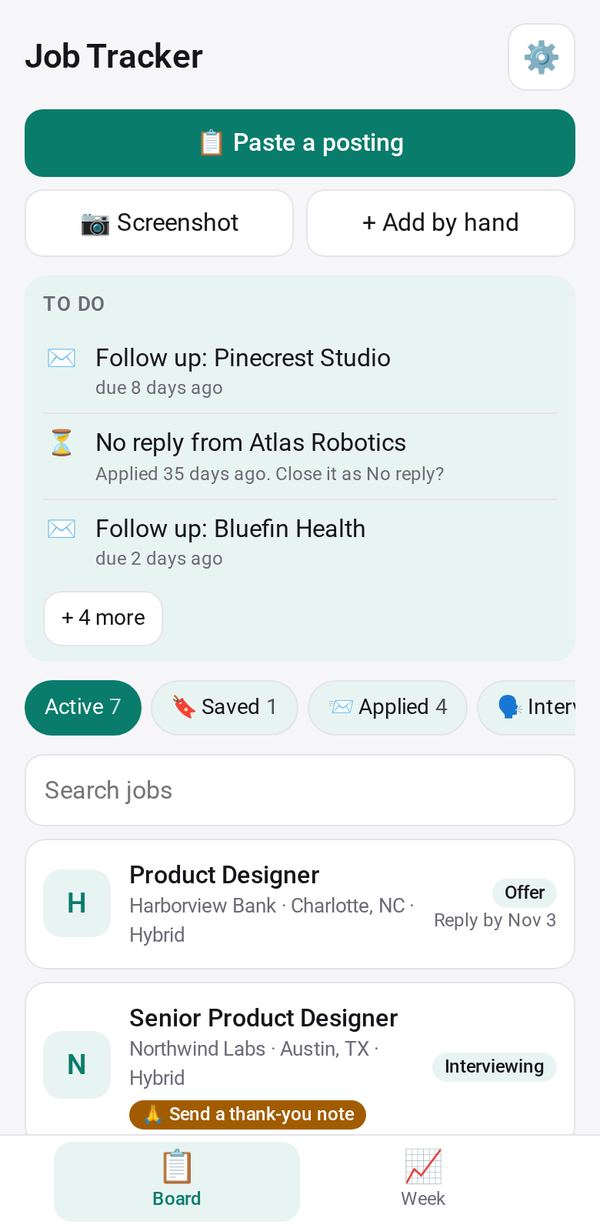
Tap "📋 Paste a posting" or "📷 Screenshot". The AI fills in the company, role, location, salary and requirements for you to check, then tap Save.
Move it through the stages
Use Move to as the job goes from saved to applied, interviewing and offer. Closing one asks why. Tap They replied when you hear back.
Follow up on time
The To do card lists follow-ups, thank-you notes, interviews and deadlines. Send the ready message by text, WhatsApp or email from your own phone.
Keep contacts, rounds and offers
On a job, add contacts by typing or from People Notes, add interview rounds with notes, and record offer details with the reply-by date.
Check your week
The Week tab shows applications, replies and interviews against your weekly goal, the last 8 weeks and your response rate. Export CSV.
Make it yours
Ask Studio: “Add a column for the salary range, and sort by it”
Hold the app and tap Edit with AI, then say what to change in plain words. Every version is kept in History. How to ask well.
In these ready-made spaces
- 🔎 Job search (Groups and work)