
Marketplace Lister
Photograph something to sell and get a ready-to-post listing with a price
- 🏷️ Sell & side business
- Just for you
- Version 7
- Free · no account
What it does
- Take a photo of something to sell
- The AI writes the title, the description and a price range
- Copy it to any marketplace
How to start
- Open Studio on your phone, on the web or on your computer, and tap Gallery (or the Find an App tile).
- Find Marketplace Lister under Sell & side business, and tap Add.
Try it with example data (in your browser, nothing is kept) · Open it in Studio on the web
Using it needs no AI. New to Studio? Get started.
Main tasks
Make a listing from photos
Tap "📷 New listing from photos", take a picture or choose up to 4 photos, and add a note about anything the photo doesn't show. The AI writes a title, a description and a price range.
Check and fix it
The listing opens for you to edit the title, price, condition and description. Tap "Write it myself" to skip the AI.
Post it anywhere
Open the listing and tap Copy listing, or Share, then paste it into any marketplace.
Track what sold
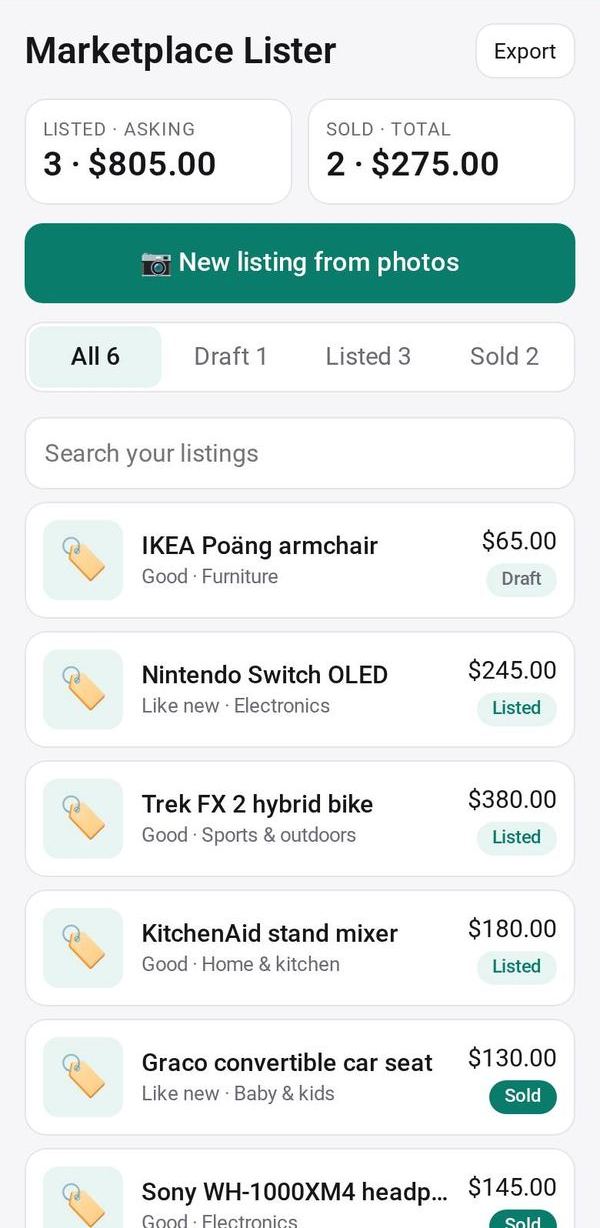
Move listings between Draft, Listed and Sold, and enter what it sold for. The top of the page totals what is listed and what has sold.
Make it yours
Ask Studio: “Always add my pickup area, and say cash only”
Hold the app and tap Edit with AI, then say what to change in plain words. Every version is kept in History. How to ask well.
In these ready-made spaces
- 🧰 Side hustle (You and your family)
More
Marketplace Lister on the apps page · Marketplace Lister: the full page · All apps