
My Pills
Never miss a pill: scan the label, tick it off, get a reminder
- 🌱 Health & habits
- Just for you
- Version 5
- Free · no account
What it does
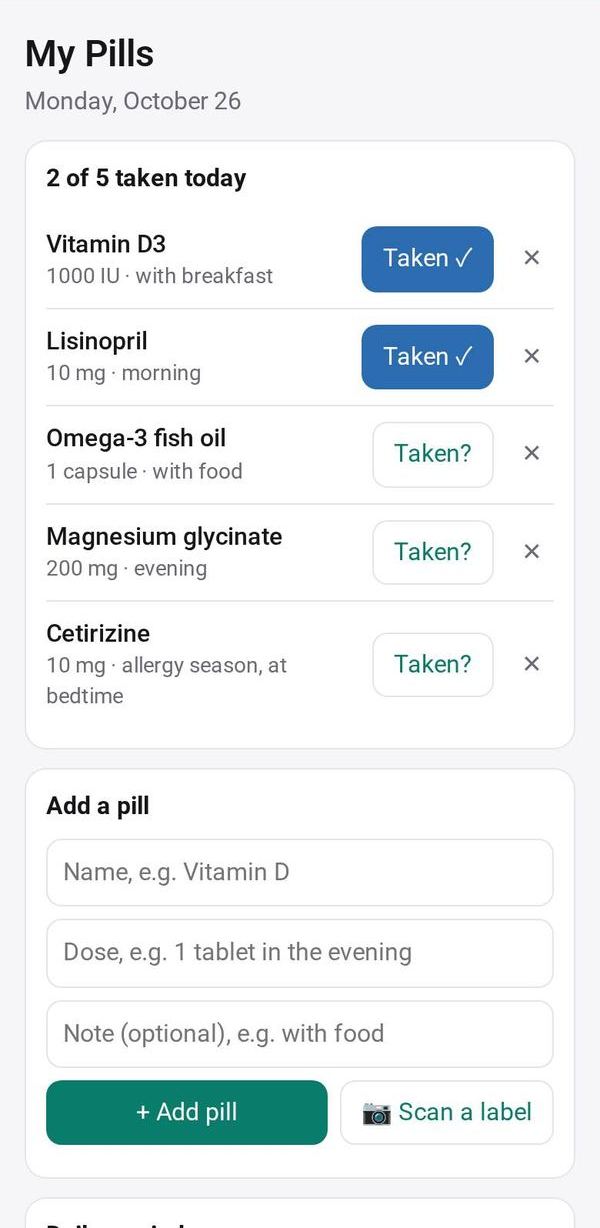
- Your daily medicines: tick each one off
- Scan a label with the camera to add one
- A reminder every evening
How to start
- Open Studio on your phone, on the web or on your computer, and tap Gallery (or the Find an App tile).
- Find My Pills under Health & habits, and tap Add.
Try it with example data (in your browser, nothing is kept) · Open it in Studio on the web
Using it needs no AI. New to Studio? Get started.
Main tasks
Add your medicines
Tap Scan a label to read the name and dose from the box, check them and tap Add. You can also type them in.
Tick off each dose
Today's list shows your medicines. Tick each one as you take it.
Set the daily reminder
Pick a time for the reminder. It is skipped on days when everything is already ticked.
Make it yours
Ask Studio: “Add my dad's pills as a second list”
Hold the app and tap Edit with AI, then say what to change in plain words. Every version is kept in History. How to ask well.
In these ready-made spaces
- 💪 Health & habits (You and your family)