
My Days
Your receipts, habits, pills and events in one private timeline: see any day, and when you last did something
- 🏠 Home & family
- Just for you
- Version 5
- Free · no account
What it does
- Receipts, habits, pills, events and more from your other apps, in one timeline
- Scroll by day, or search
- See when you last did something
How to start
- Open Studio on your phone, on the web or on your computer, and tap Gallery (or the Find an App tile).
- Find My Days under Home & family, and tap Add.
Try it with example data (in your browser, nothing is kept) · Open it in Studio on the web
Using it needs no AI. New to Studio? Get started.
Main tasks
Choose which apps to include
Tap 🔗 to see the list of apps, then Allow each one you want in your timeline, such as Receipt Keeper, Habit Streak or Focus Timer. Nothing is copied; the timeline reads them each time you open it.
Scroll through your days
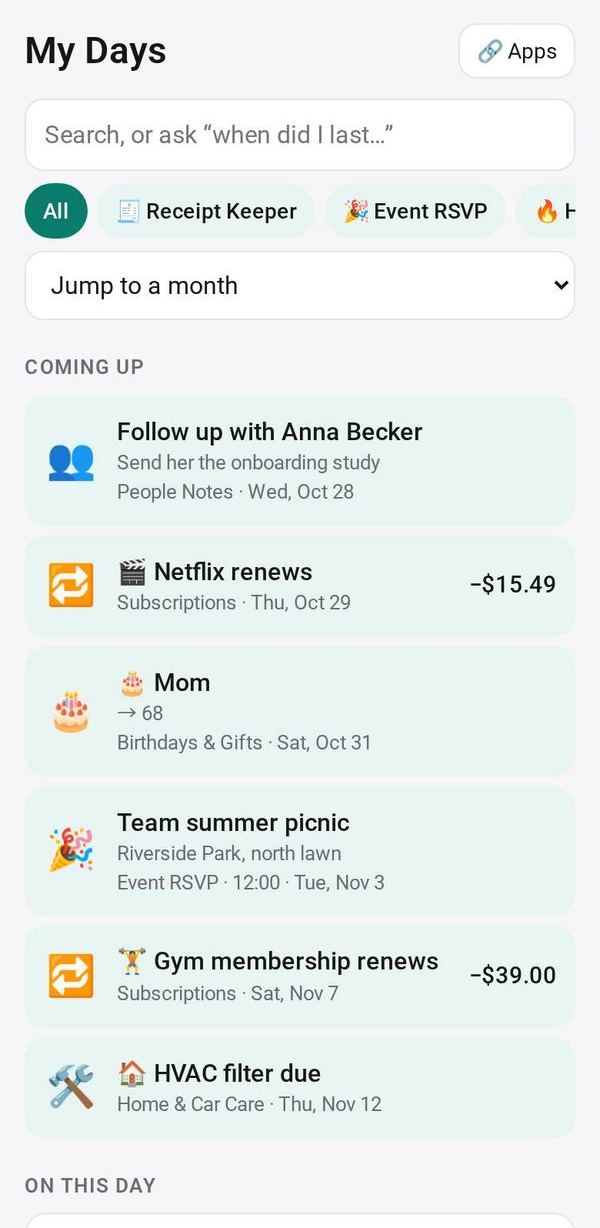
The timeline shows each day, newest first. Tap a chip to see one app only, or jump to a month.
Find when you last did something
Type in the search box, for example "haircut". The newest match shows as "Last:" with the date, how long ago, and how many times in total.
Look ahead and back
Coming up shows the next 30 days, such as subscription renewals. On this day shows the same date in earlier months and years.
Make it yours
Ask Studio: “Add a mood for each day”
Hold the app and tap Edit with AI, then say what to change in plain words. Every version is kept in History. How to ask well.
In these ready-made spaces
- 🌱 Personal starter (You and your family)
- 🏡 Home & family (You and your family)
- 💪 Health & habits (You and your family)