
Notice Board
Put notices, events, photos and countdowns on the TV in your school, office or shop, each shown between the dates you pick
- 🛠️ Work
- Just for you
- Version 11
- Free · no account
What it does
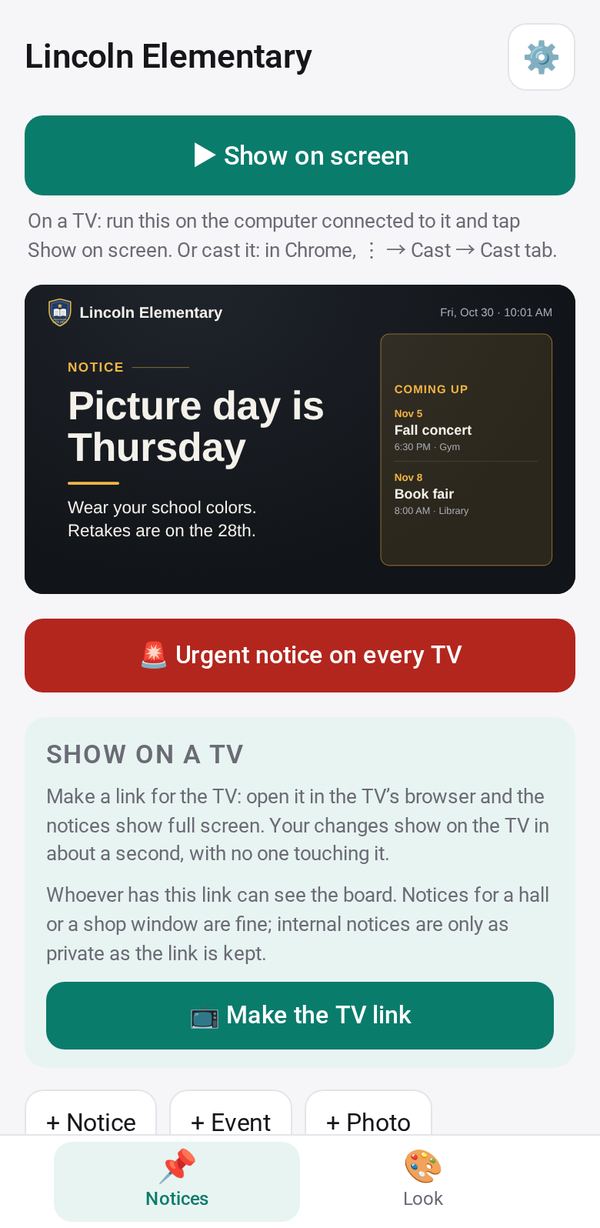
- Notices, events, photos and countdowns, each shown between the dates you pick
- An urgent notice fills every TV at once
- Wide 1080p TVs get a side panel with what is coming up
How to start
- Open Studio on your phone, on the web or on your computer, and tap Gallery (or the Find an App tile).
- Find Notice Board under Work, and tap Add.
Try it with example data (in your browser, nothing is kept) · Open it in Studio on the web
Using it needs no AI. New to Studio? Get started.
Main tasks
Add notices
In the Notices tab, tap "+ Notice", "+ Event", "+ Photo" or "+ Countdown", and choose the dates each one shows. The lists show what is Showing now, Scheduled and Ended.
Pick a look
In the Look tab, choose a style, a background and your logo. Or tap "🎨 Design from a picture" and pick Faithful, Bolder or Calmer.
Put it on a TV
Tap "📺 Make the TV link", then Send or Copy it to the TV's browser, or use "📷 Pair a TV". Use "+ Add screen" for more TVs.
Send an urgent notice
Tap "🚨 Urgent notice on every TV", write what to do and how long it lasts. It fills every screen at once until it ends or you tap End now.
Make a playlist
Combine your notice screens with Menu Board screens or another TV link, each for its own number of seconds, on one TV.
Make it yours
Ask Studio: “Add the lunch menu for each day of the week”
Hold the app and tap Edit with AI, then say what to change in plain words. Every version is kept in History. How to ask well.
In these ready-made spaces
- ☕ Café (Your business)
- 🏫 School office (Your business)
- 💼 At work (Groups and work)