
Payments
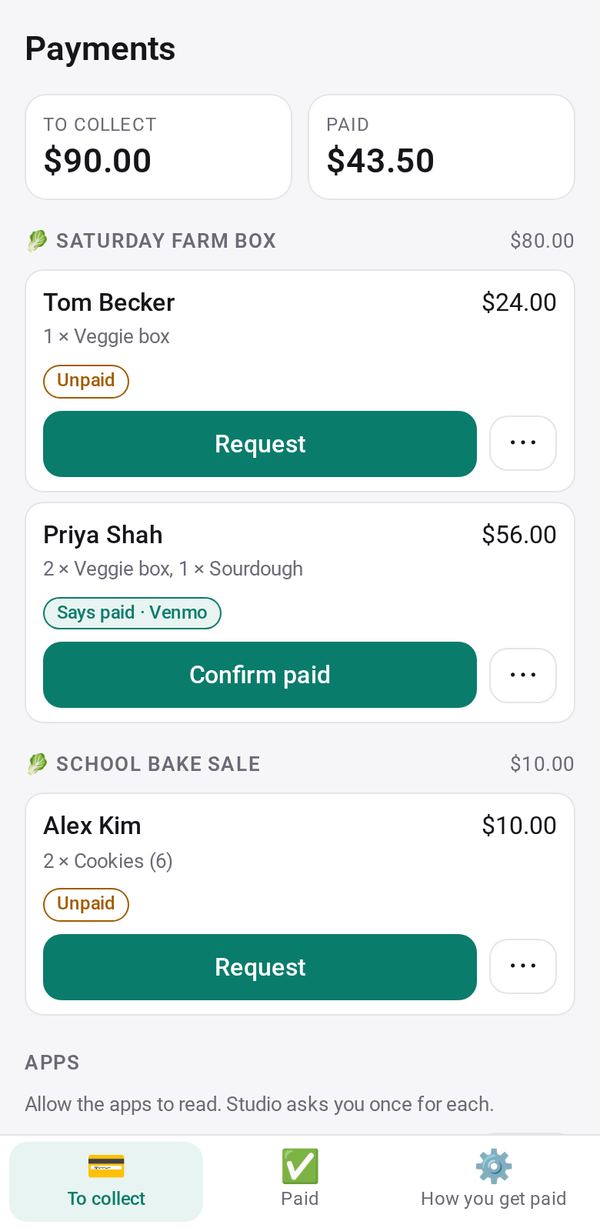
Collect what people owe you: send a request with your pay links and the amount filled in, and mark who has paid
- 🏷️ Sell & side business
- Just for you
- Version 11
- Free · no account
What it does
- What people owe you from Shop, Order Form, Bookings, invoices, Sign-up Sheet and Group Order
- Send each a request with your PayPal, Venmo, Cash App or Zelle details and the amount filled in
- A QR code to pay in person; see who says they paid, then mark them paid
How to start
- Open Studio on your phone, on the web or on your computer, and tap Gallery (or the Find an App tile).
- Find Payments under Sell & side business, and tap Add.
Try it with example data (in your browser, nothing is kept) · Open it in Studio on the web
Using it needs no AI. New to Studio? Get started.
Main tasks
Set how you get paid
In How you get paid, add your PayPal, Venmo, Cash App, Zelle or payment link, or tap "Use my business profile".
Bring in what you are owed
Tap Allow for your apps such as Shop, Order Form and Bookings. To collect lists everyone who owes you, with totals.
Send a payment request
Tap Request on a person to share a message with their amount and your pay links filled in. For in-person payment, use QR code from ⋯.
Mark who paid
When someone says they paid, tap "Confirm paid"; otherwise tap Mark paid and pick the method. Then tap the Update button for that app so the customer's page shows Paid.
Send reminders
Unpaid people wait under "To remind" at the top of To collect. Choose text, WhatsApp or mail at the bottom of How you get paid.
Make it yours
Ask Studio: “Remind me about anything still unpaid after a week”
Hold the app and tap Edit with AI, then say what to change in plain words. Every version is kept in History. How to ask well.
In these ready-made spaces
- ☕ Café (Your business)
- 💇 Salon & services (Your business)
- 📚 Tutor (Your business)
- 🛠️ Contractor (Your business)
- 🏫 School office (Your business)
- 🧺 Farm & market (Your business)