
Quotes & Invoices
Send a quote, see when it is accepted, and when the invoice is paid
- 🏷️ Sell & side business
- Send it to people
- Version 19
- Free · no account
What it does
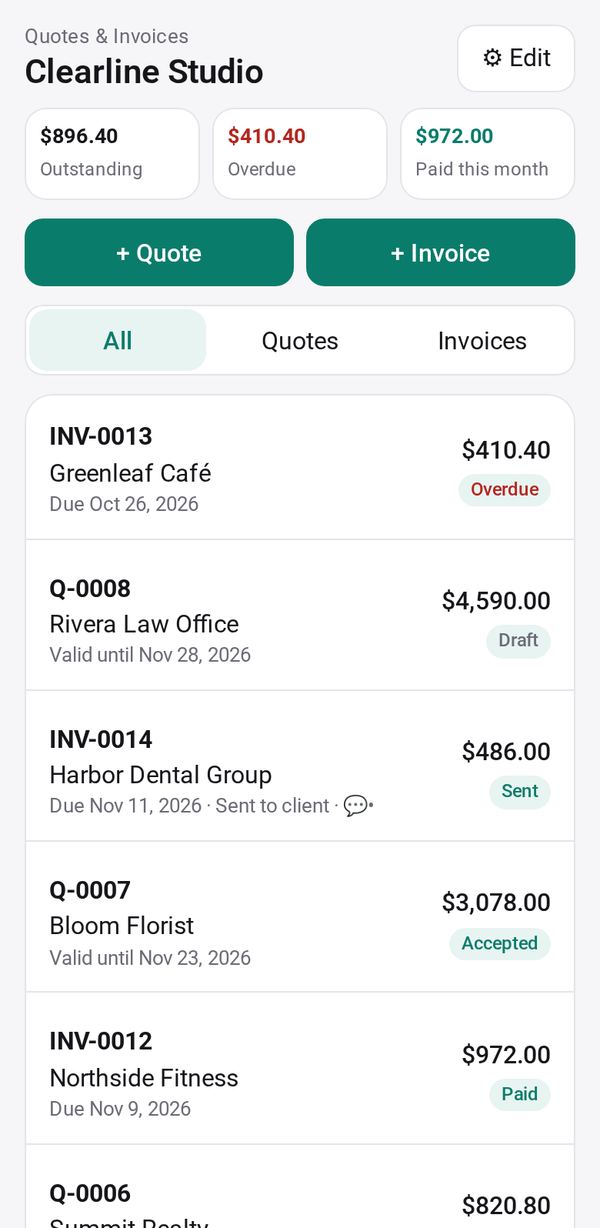
- Make quotes and invoices
- Show one to a client with a link
- See when it is accepted or paid
The people you send its link to open it in any browser, with nothing to install and no account. What they send comes back sealed, so only you can read it.
How to start
- Open Studio on your phone, on the web or on your computer, and tap Gallery (or the Find an App tile).
- Find Quotes & Invoices under Sell & side business, and tap Add.
Try it with example data (in your browser, nothing is kept) · Open it in Studio on the web
Using it needs no AI. New to Studio? Get started.
Main tasks
Set up your business details
In ⚙ Edit, add your name, contact details, how to pay you, currency and tax rate, or tap "Use my business profile".
Make a quote or invoice
Create a quote or invoice, add the client and the lines with quantity and unit price, and the totals are worked out. "📷 Fill from a photo" can read a written request into the form.
Send it to the client
Tap "Send to the client" to share a link. The client opens it in their browser and taps "Accept quote" or "I've paid".
Turn a quote into an invoice
Once a quote is accepted, tap "Make an invoice" to copy it into a new invoice.
Get paid and follow up
When a client says they paid, tap "Confirm paid" or "Not paid"; otherwise "Mark paid". Unpaid invoices wait under "To remind", where Send opens a reminder in your own messages or mail.
Make it yours
Ask Studio: “Put my logo and payment details on every invoice”
Hold the app and tap Edit with AI, then say what to change in plain words. Every version is kept in History. How to ask well.
In these ready-made spaces
- 📚 Tutor (Your business)
- 🛠️ Contractor (Your business)