
Receipt Keeper
Snap receipts, find any one in seconds, and look back by month or by place
- 💰 Money
- Just for you
- Version 9
- Free · no account
What it does
- Snap a receipt: store, date and total are filled in for you
- Mark it business or personal, with a warning if it is already saved
- Search every receipt, by month or by place, and export CSV
How to start
- Open Studio on your phone, on the web or on your computer, and tap Gallery (or the Find an App tile).
- Find Receipt Keeper under Money, and tap Add.
Try it with example data (in your browser, nothing is kept) · Open it in Studio on the web
Using it needs no AI. New to Studio? Get started.
Main tasks
Snap a receipt
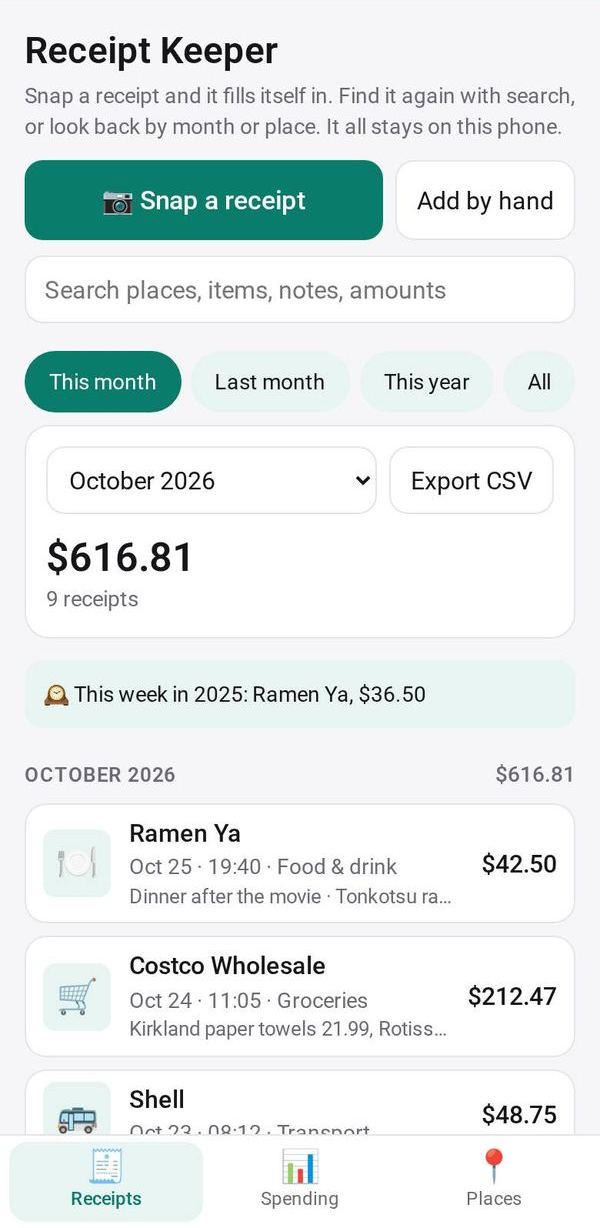
Tap "Snap a receipt" and take a picture or choose a photo. The store, date, total and items are filled in for you to check, then tap save. "Add by hand" opens the same form empty.
Mark it Business or Personal
Use the 💼 Business / 🏠 Personal switch at the top of the form and pick a category. Next time at the same store, the app picks the same ones for you.
Look back by month or by place
Pick a period, such as This month or This year, then use Receipts, Spending (a chart and totals by category) or Places (how much and how often at each store).
Find a receipt
Type in the search box at the top. It looks through the store, items, note, category, date and amount, and shows the count and total as you type.
Export for your records
Pick a period and tap Export CSV to save a spreadsheet file with every receipt in it, marked business or personal.
Make it yours
Ask Studio: “Add a column for which project each receipt belongs to”
Hold the app and tap Edit with AI, then say what to change in plain words. Every version is kept in History. How to ask well.
In these ready-made spaces
- ☕ Café (Your business)
- 💇 Salon & services (Your business)
- 🛠️ Contractor (Your business)
- 🌱 Personal starter (You and your family)
- 🧺 Farm & market (Your business)
- 💵 Household money (You and your family)
- 🧰 Side hustle (You and your family)