
Recipe Box
Save recipes from a photo, scale servings and get the shopping list
- 🏠 Home & family
- Just for you
- Version 5
- Free · no account
What it does
- Snap a cookbook page or a recipe card to save it
- Scale servings and cook one step at a time
- Build a shopping list from a recipe
How to start
- Open Studio on your phone, on the web or on your computer, and tap Gallery (or the Find an App tile).
- Find Recipe Box under Home & family, and tap Add.
Try it with example data (in your browser, nothing is kept) · Open it in Studio on the web
Using it needs no AI. New to Studio? Get started.
Main tasks
Save a recipe
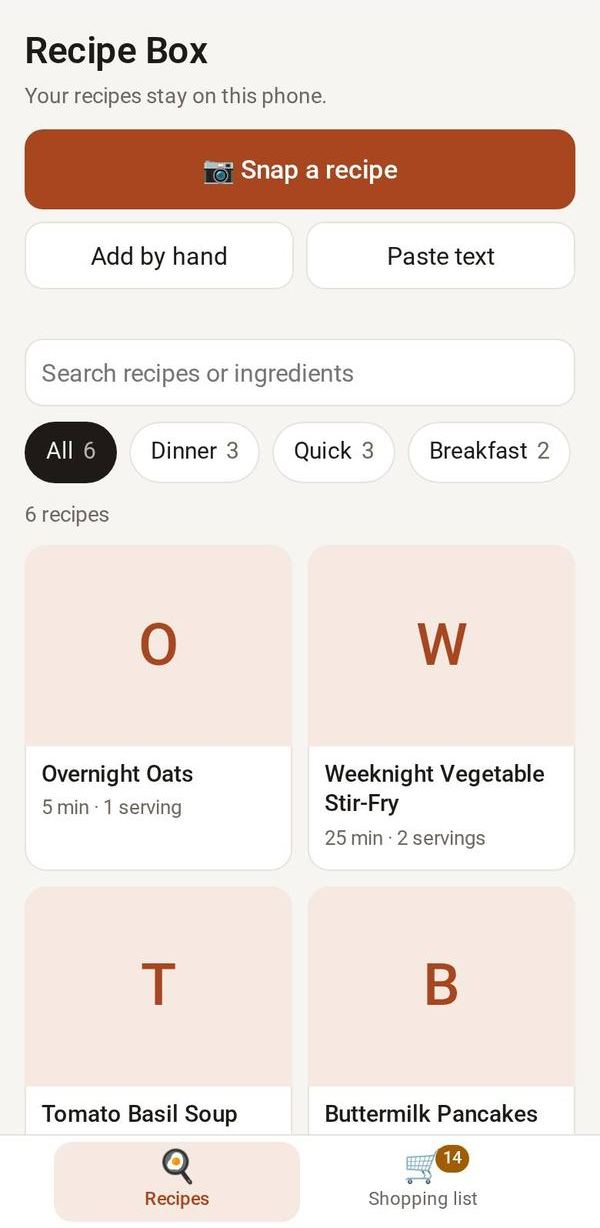
Tap "Snap a recipe" to photograph a cookbook page or card, "Paste text" to paste one, or "Add by hand". Check the ingredients and steps, then save.
Find a recipe
In Recipes, search by title, tag or ingredient, or tap a tag chip.
Scale and cook
Open a recipe and use − and + to change the servings; every amount adjusts. Tap Cook mode to see one step at a time in large type.
Make a shopping list
In the Shopping list tab, pick recipes and their servings. Matching ingredients are added up; tick items off, or copy what is left as text.
Make it yours
Ask Studio: “Add a tag for quick weeknight dinners”
Hold the app and tap Edit with AI, then say what to change in plain words. Every version is kept in History. How to ask well.
In these ready-made spaces
- 🏡 Home & family (You and your family)
- 🎨 Hobbies (You and your family)