
Saved Links
Keep links to read later in folders, and share a reading list
- 📚 Learning & people
- Just for you
- Version 5
- Free · no account
What it does
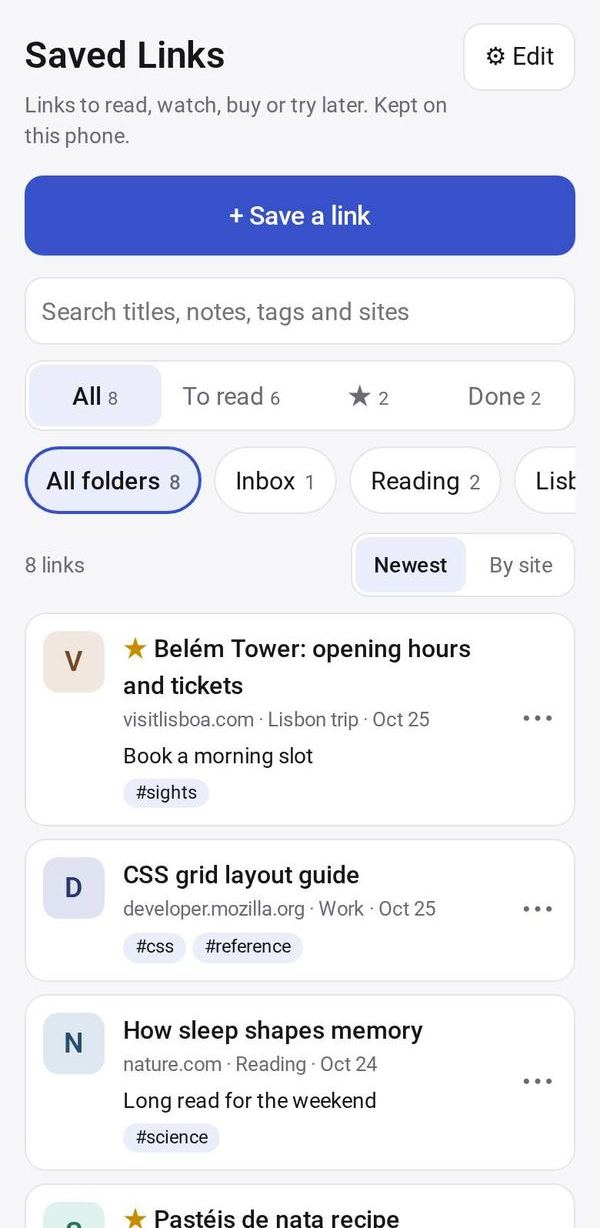
- Keep links to read, watch, buy or try later
- Folders, notes and tags
- Share one folder as a reading list
How to start
- Open Studio on your phone, on the web or on your computer, and tap Gallery (or the Find an App tile).
- Find Saved Links under Learning & people, and tap Add.
Try it with example data (in your browser, nothing is kept) · Open it in Studio on the web
Using it needs no AI. New to Studio? Get started.
Main tasks
Save a link
Tap "+ Save a link" and paste a link or a whole shared message. The title fills in; add a note, a folder, tags or a ★.
Find what to read next
Use the All, To read, ★ and Done tabs, the folder chips and search. Sort by Newest or By site.
Mark it done
Tap a link to open it. Use ⋯ to Mark done, move it to a folder, copy it or delete it.
Share a reading list
Tap "Share a reading list" and pick a folder. Whoever gets it can tap "Save to my links". Tap Stop sharing when you are done.
Make it yours
Ask Studio: “Add a read-by date to each link”
Hold the app and tap Edit with AI, then say what to change in plain words. Every version is kept in History. How to ask well.
In these ready-made spaces
- ✏️ Student (You and your family)
- 🎨 Hobbies (You and your family)
- 🔎 Job search (Groups and work)