
Shift Board
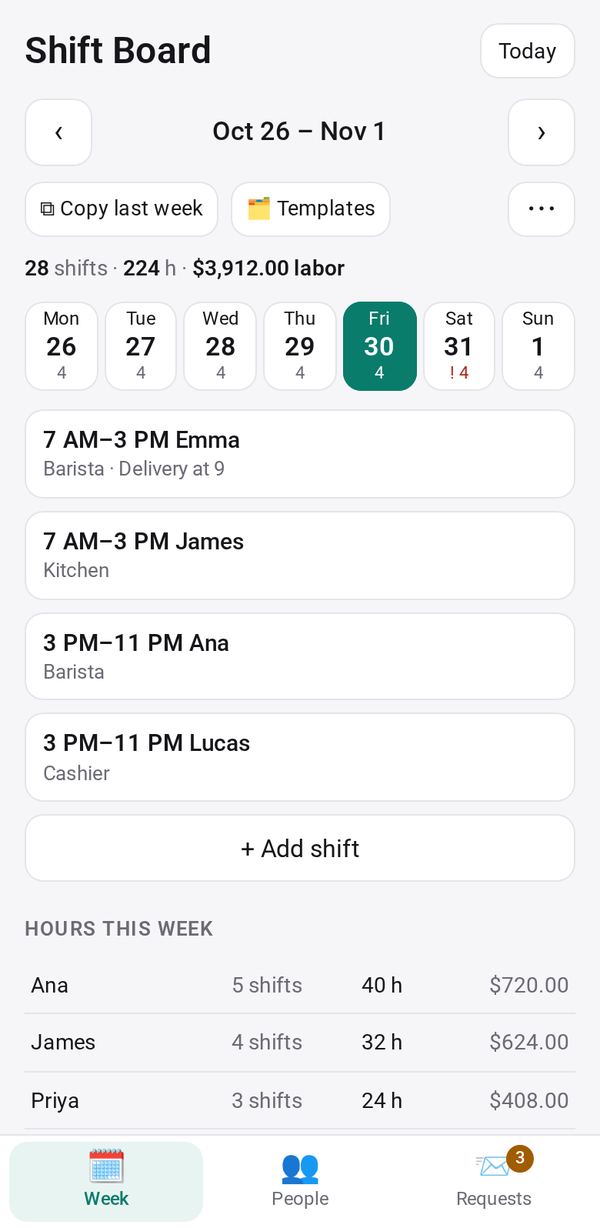
Your staff schedule with shift times and roles: copy last week, print it, and staff see their own shifts and ask for time off on a link
- 🛠️ Work
- Send it to people
- Version 7
- Free · no account
What it does
- Who is on, which days
- A week at a glance on a computer
- One day at a time on a phone
The people you send its link to open it in any browser, with nothing to install and no account. What they send comes back sealed, so only you can read it.
How to start
- Open Studio on your phone, on the web or on your computer, and tap Gallery (or the Find an App tile).
- Find Shift Board under Work, and tap Add.
Try it with example data (in your browser, nothing is kept) · Open it in Studio on the web
Using it needs no AI. New to Studio? Get started.
Main tasks
Add your staff
In People, add each person with their usual role and, if you like, an hourly rate for labor cost. Rates are never shown to staff.
Build the week
In Week, tap "+ Add shift" on a day, pick the days, a template such as Open or Close, the person or an open shift, and the times. "⧉ Copy last week" and "🗂 Templates" fill a week fast.
Share the schedule with staff
In People, tap "🔗 Make the staff link" and send it, or "📤 Send their link" to one person. Staff see their own shifts, take open shifts, ask for time off and send their availability.
Decide requests
In Requests, Approve or Decline time off and availability, and Confirm someone for an open shift. Conflicts show in red on the schedule.
Print or show the week
From ⋯, use "🖨 Print week", "📺 Show on screen" for a TV, or "⬇ Export CSV". Hours per person show in the week summary.
Make it yours
Ask Studio: “Split each day into morning and evening shifts”
Hold the app and tap Edit with AI, then say what to change in plain words. Every version is kept in History. How to ask well.
In these ready-made spaces
- ☕ Café (Your business)
- 🏫 School office (Your business)
- 💼 At work (Groups and work)