
Side Income
Know what your side work really earns each month, and what to set aside for tax
- 🏷️ Sell & side business
- Just for you
- Version 5
- Free · no account
What it does
- Record what your side work brings in and costs
- See each month's profit by source
- An estimate of what to set aside for tax
How to start
- Open Studio on your phone, on the web or on your computer, and tap Gallery (or the Find an App tile).
- Find Side Income under Sell & side business, and tap Add.
Try it with example data (in your browser, nothing is kept) · Open it in Studio on the web
Using it needs no AI. New to Studio? Get started.
Main tasks
Record income and costs
Tap "+ Income" or "+ Cost", enter the amount and Save. Today's date and your last source are already filled in.
Set up your sources
In ⚙ Edit, rename or add sources such as Tutoring or Freelance, and set your currency and tax percentage.
See each month's profit
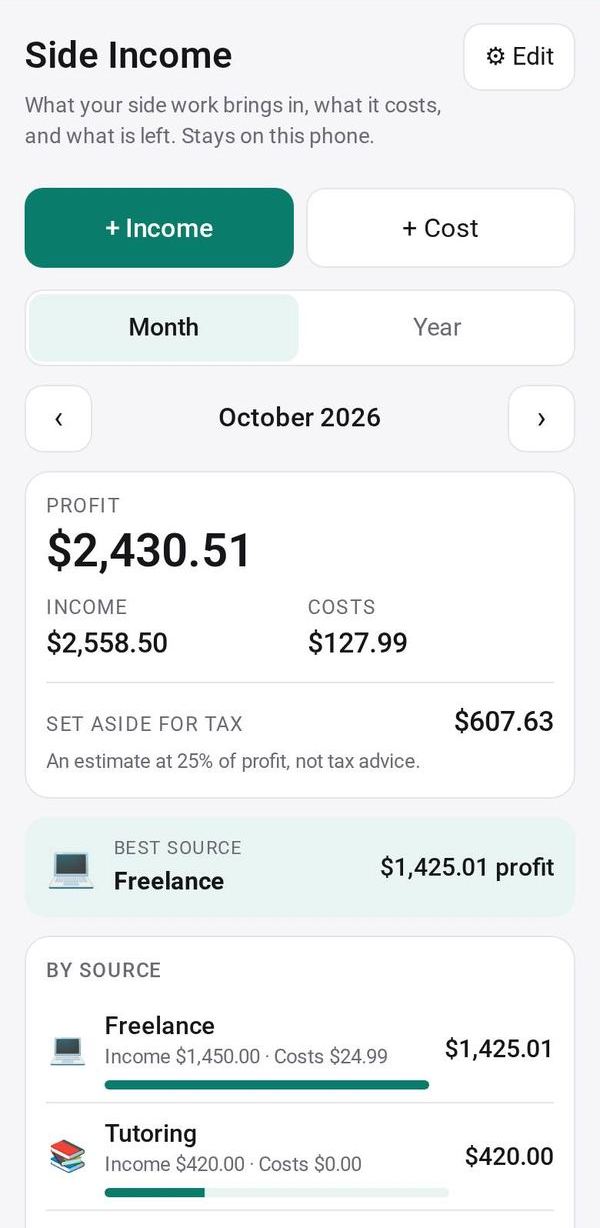
The Month view shows profit, income and costs by source, your best source, and an estimate to set aside for tax. Use ‹ › to move between months, or switch to the Year view.
Give costs a business category
When adding a cost, pick its business category so Tax Year Pack puts it on the right line.
Export a month or year
Tap Export CSV to save the month or year you are looking at as a spreadsheet file.
Make it yours
Ask Studio: “Add the miles I drive for deliveries”
Hold the app and tap Edit with AI, then say what to change in plain words. Every version is kept in History. How to ask well.
In these ready-made spaces
- 💵 Household money (You and your family)
- 🧰 Side hustle (You and your family)