
Supplier Quotes
Get prices from several suppliers with one request, compare them line by line and award the best
- 🏷️ Sell & side business
- Send it to people
- Version 1
- Free · no account
What it does
- List what you need and send each supplier their own link
- Their prices come back to your phone, sealed so only you can read them
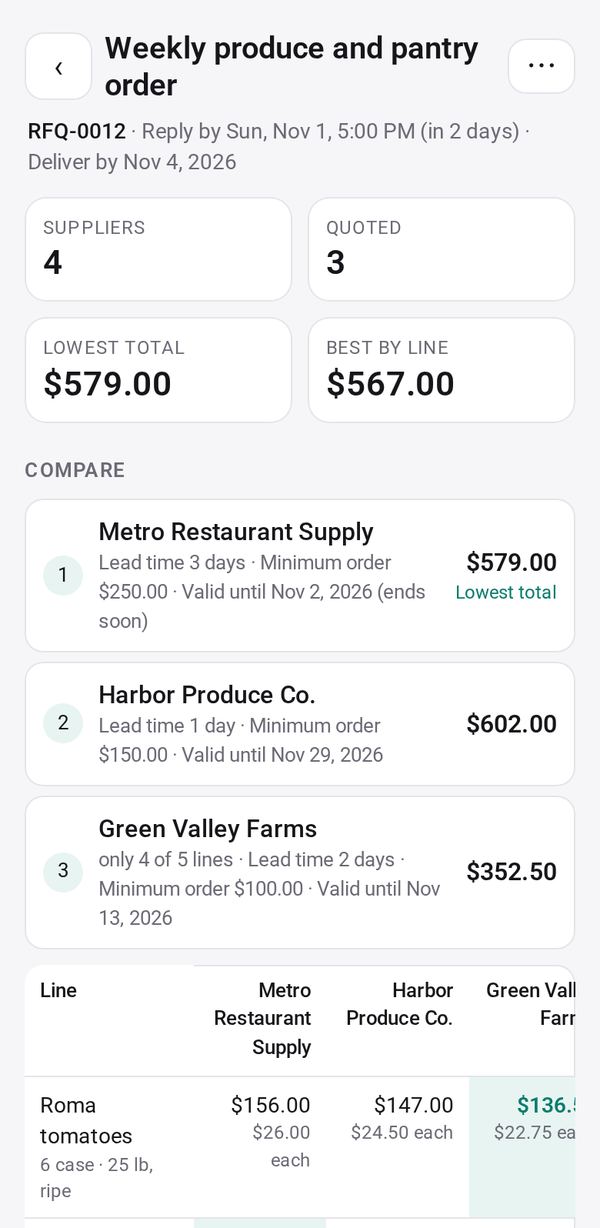
- Compare line by line, award the best, and thank the others
The people you send its link to open it in any browser, with nothing to install and no account. What they send comes back sealed, so only you can read it.
How to start
- Open Studio on your phone, on the web or on your computer, and tap Gallery (or the Find an App tile).
- Find Supplier Quotes under Sell & side business, and tap Add.
Try it with example data (in your browser, nothing is kept) · Open it in Studio on the web
Using it needs no AI. New to Studio? Get started.
Main tasks
Write a request for quotes
Create a request with the items, quantities and specs, where and when to deliver, and the reply-by time.
Send it to each supplier
Add your suppliers and tap Send to give each one their own link by text, WhatsApp, email or a QR code. They answer in their browser, with nothing to install.
Enter a paper quote
For a supplier who sends a paper or PDF quote, tap Enter their quote, then "📷 Read their quote", check the prices and Save.
Compare and award
Open Compare to see totals and a line-by-line table with the lowest price marked. Tap Award… for the whole request or line by line.
Tell the suppliers
After the award, use "Tell the suppliers" to send each one a message, and print purchase orders.
Make it yours
Ask Studio: “Ask each supplier for their delivery date too”
Hold the app and tap Edit with AI, then say what to change in plain words. Every version is kept in History. How to ask well.
In these ready-made spaces
- ☕ Café (Your business)
- 🛠️ Contractor (Your business)
- 🧺 Farm & market (Your business)