
Usual Orders
Your usual orders from every store in one list: tick and send each store its order
- 🏠 Home & family
- Just for you
- Version 8
- Free · no account
What it does
- The things you order again and again, from any store, in one list
- Tick what you want this time
- Send each store its order in one tap
How to start
- Open Studio on your phone, on the web or on your computer, and tap Gallery (or the Find an App tile).
- Find Usual Orders under Home & family, and tap Add.
Try it with example data (in your browser, nothing is kept) · Open it in Studio on the web
Using it needs no AI. New to Studio? Get started.
Main tasks
Add your stores
In 🏪 Stores, tap "+ Store" and choose how it takes orders: Amazon, Walmart, Instacart, a text, email, call, website or a Studio shop.
Add the things you reorder
Add items with their store, usual quantity and price, or tap 📷 to read a photo or screenshot of an order history, receipt or menu.
Pick this time's order
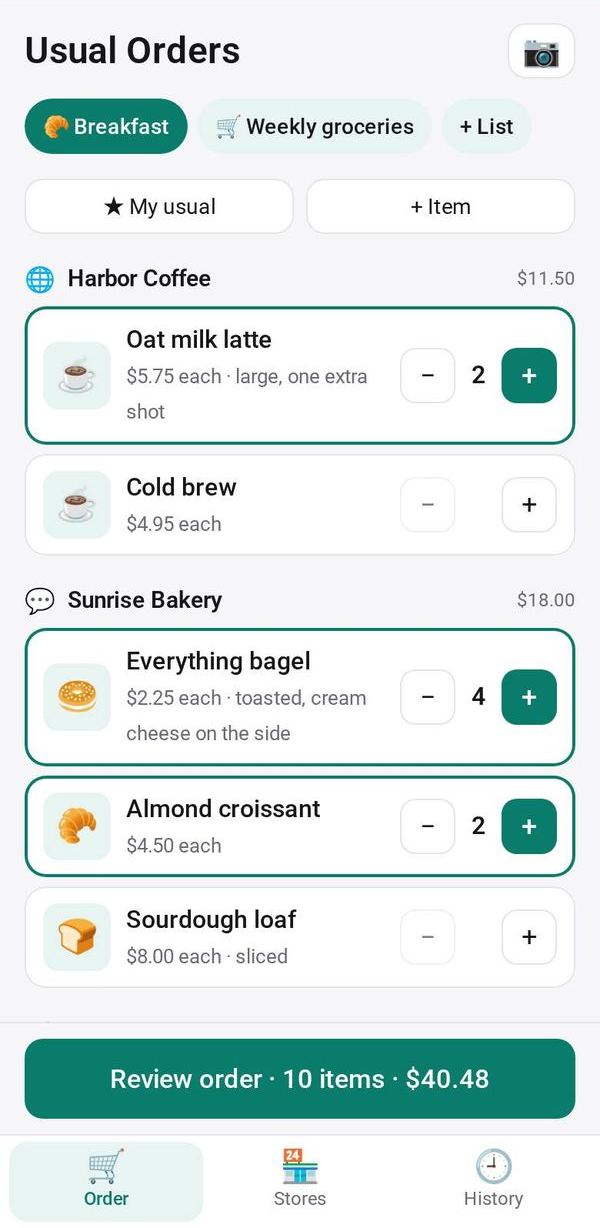
In 🛒 Order, use − / + on each item, or tap "★ My usual" to pick the usual ones at their usual quantity.
Send each store its order
Review the order and tap each store's button. It opens a cart, a ready message, a call or the shop with your order filled in. Payment stays with the store.
Order again
In 🕘 History, tap Again on a past order to pick the same items.
Make it yours
Ask Studio: “Add a note for each store, like its delivery day”
Hold the app and tap Edit with AI, then say what to change in plain words. Every version is kept in History. How to ask well.
In these ready-made spaces
- 🏡 Home & family (You and your family)