
Inbox
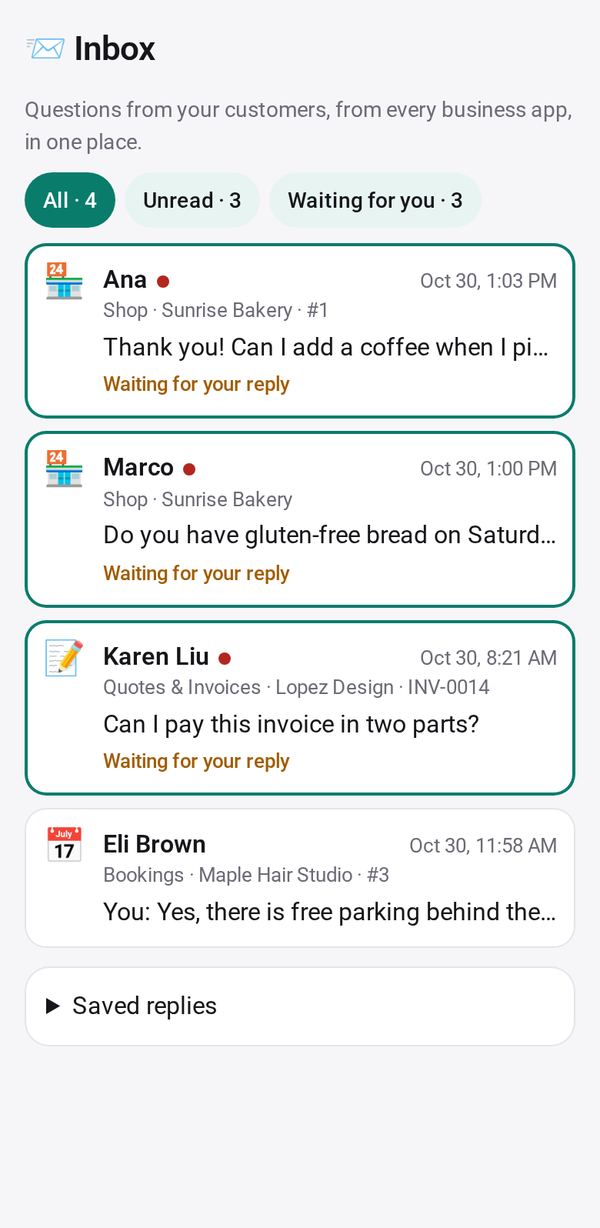
Answer every customer question from your shop, orders, bookings and invoices in one place
- 🏷️ Sell & side business
- Just for you
- Version 1
- Free · no account
What it does
- Every question from Shop, Order Form, Bookings, invoices, Group Order and Waitlist, unread first
- Saved replies, and one tap to open the order or booking
- Continue in WhatsApp, text, email or a call, with your reply filled in
How to start
- Open Studio on your phone, on the web or on your computer, and tap Gallery (or the Find an App tile).
- Find Inbox under Sell & side business, and tap Add.
Try it with example data (in your browser, nothing is kept) · Open it in Studio on the web
Using it needs no AI. New to Studio? Get started.
Main tasks
See every question in one place
Tap Allow for your business apps. Questions from your Shop, Order Form, Bookings, invoices, Group Order and Waitlist pages show unread first. Use the chips All, Unread and Waiting for you.
Reply
Tap a question to open it and write a reply, or pick one of your saved replies. Manage them under Saved replies.
Continue elsewhere or open the order
Tap Continue in WhatsApp, Text, Email or Call to answer in your own apps, or Open in the app the question came from to see the order or booking.
Make it yours
Ask Studio: “Show questions from Bookings first on Saturdays”
Hold the app and tap Edit with AI, then say what to change in plain words. Every version is kept in History. How to ask well.
In these ready-made spaces
- ☕ Café (Your business)
- 💇 Salon & services (Your business)
- 📚 Tutor (Your business)
- 🛠️ Contractor (Your business)
- 🧺 Farm & market (Your business)