
Waitlist
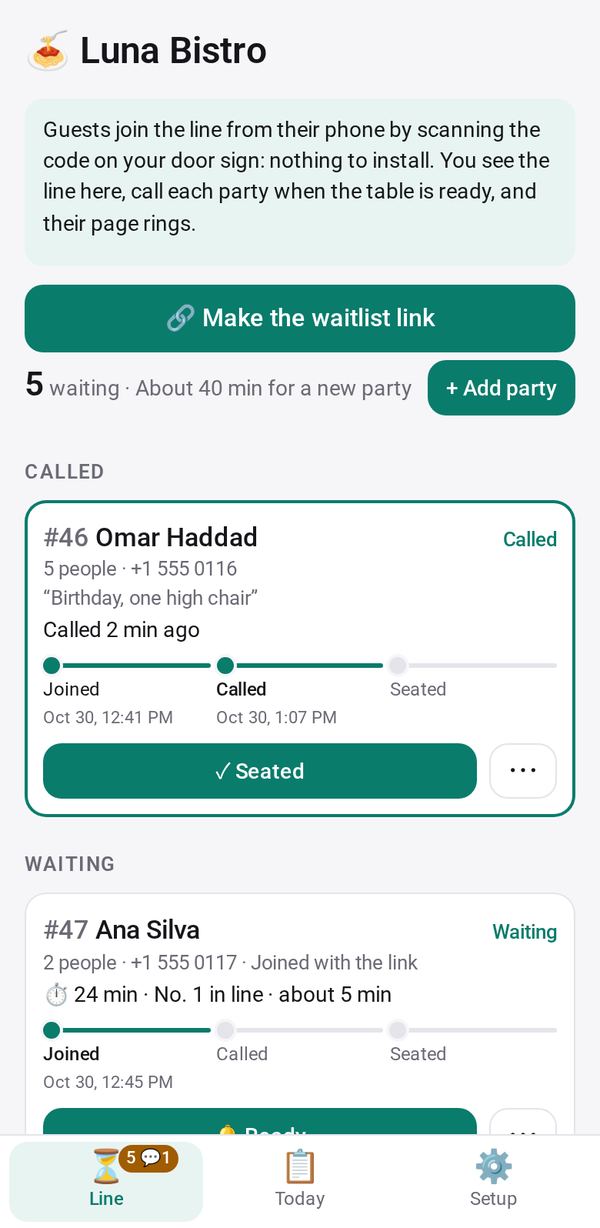
A wait line from a QR code at the door: guests see their place and wait on their phone, and their page rings when you call them
- 🏷️ Sell & side business
- Send it to people
- Version 2
- Free · no account
What it does
- Guests join from a QR code at the door, with nothing to install
- They see their place and wait, and their page rings when you call them
- A Now calling screen for a TV, with first names or initials only
The people you send its link to open it in any browser, with nothing to install and no account. What they send comes back sealed, so only you can read it.
How to start
- Open Studio on your phone, on the web or on your computer, and tap Gallery (or the Find an App tile).
- Find Waitlist under Sell & side business, and tap Add.
Try it with example data (in your browser, nothing is kept) · Open it in Studio on the web
Using it needs no AI. New to Studio? Get started.
Main tasks
Put up the door sign
Open the door sign, which shows your business name, "Join the waitlist" and a QR code, and tap Print. Guests scan it and join with their name and party size.
Add a walk-in yourself
Add a party at the door and text them a link so they can follow their place on their own phone.
Call the next party
Tap Ready on a party. Their page shows "Your table is ready" with a sound, and you can also text or call them from ⋯.
Seat or clear a party
Tap Seated once they sit down, or use ⋯ for No-show, Back in line or Remove.
Show it on a TV
Open the TV screen link on a TV to show Now calling, Next, the wait time and a QR code to join. It never shows phone numbers.
Make it yours
Ask Studio: “Ask for the guest's seating choice: inside, patio or bar”
Hold the app and tap Edit with AI, then say what to change in plain words. Every version is kept in History. How to ask well.
In these ready-made spaces
- ☕ Café (Your business)
- 💇 Salon & services (Your business)
More
Waitlist on the apps page · Waitlist: the full page · All apps