
Lesson Notes
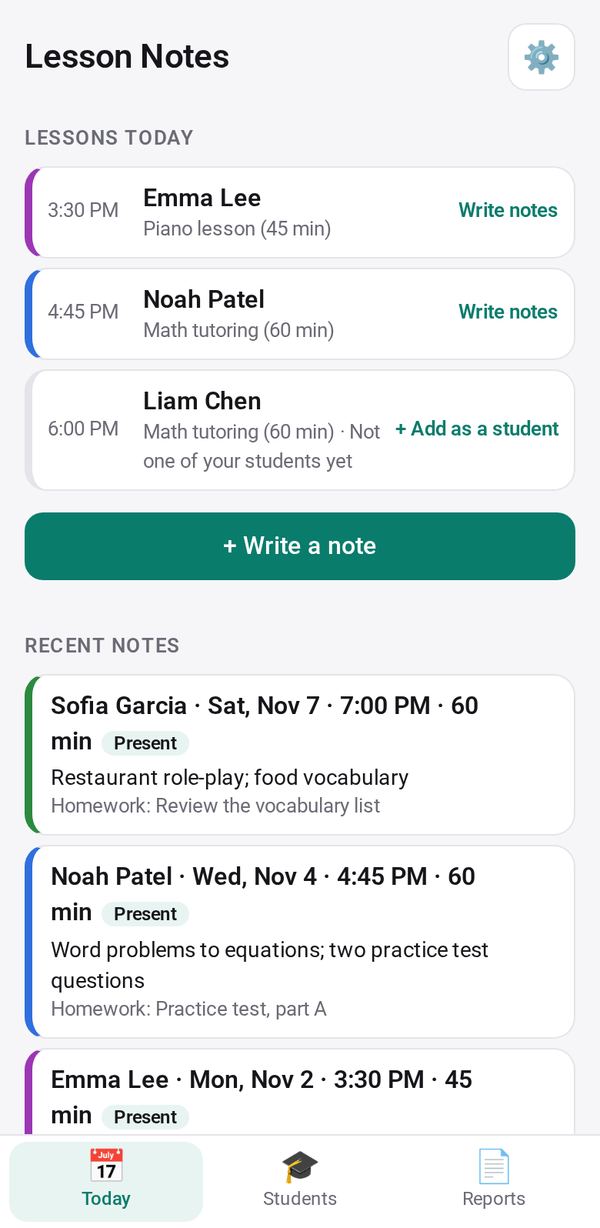
A note after every lesson, today's lessons from Bookings, and a monthly report to send each parent
- 🏷️ Sell & side business
- Just for you
- Version 1
- Free · no account
What it does
- A note after every lesson: attendance, what you covered, homework, next time
- Today's lessons come from Bookings, so the right student is already open
- A monthly report for each parent, sent from your own phone
How to start
- Open Studio on your phone, on the web or on your computer, and tap Gallery (or the Find an App tile).
- Find Lesson Notes under Sell & side business, and tap Add.
Try it with example data (in your browser, nothing is kept) · Open it in Studio on the web
Using it needs no AI. New to Studio? Get started.
Main tasks
Add your students
Tap Students, then + Add a student with their parent and subject.
Write a note after a lesson
Tap + Write a note, or Write notes beside one of today's lessons from Bookings. Mark attendance and the last homework, then write what you covered, the homework, next time, a note for the parent and a private one. ↺ From last lesson copies what carries over.
Send the monthly report
On Reports, pick a student and a month. The report has the lessons held and missed, what was covered, homework and your notes for the parent, never a private note. Send it by WhatsApp, text or email from your own phone, or copy it.
Export
On Reports, tap Lessons (CSV) to export every lesson note, for your records or a spreadsheet.
Make it yours
Ask Studio: “Add a line for the piece each student is practising”
Hold the app and tap Edit with AI, then say what to change in plain words. Every version is kept in History. How to ask well.
In these ready-made spaces
- 📚 Tutor (Your business)