
Loyalty Card
A stamp card your regulars keep as a link: one tap to stamp, the reward redeemed once, and a review asked the same way of everyone
- 🏷️ Sell & side business
- Send it to people
- Version 1
- Free · no account
What it does
- Each regular keeps their card as a link: no app, no account
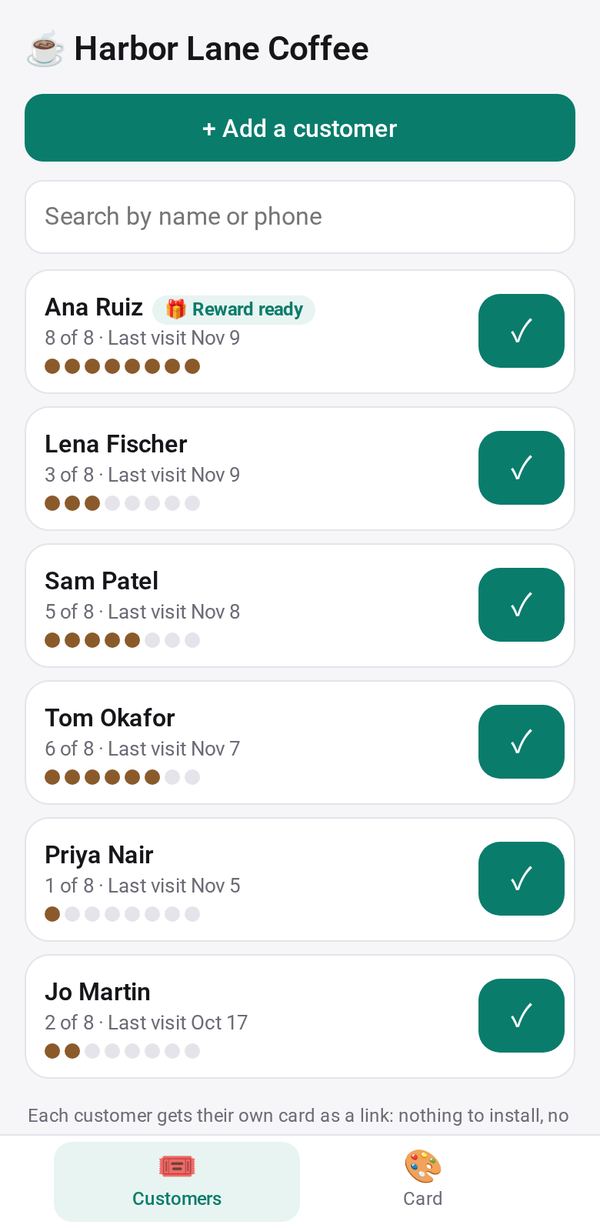
- One tap at the counter stamps it, and the card fills up on their phone
- The reward is redeemed once and starts again; double-stamp days when you choose
The people you send its link to open it in any browser, with nothing to install and no account. What they send comes back sealed, so only you can read it.
How to start
- Open Studio on your phone, on the web or on your computer, and tap Gallery (or the Find an App tile).
- Find Loyalty Card under Sell & side business, and tap Add.
Try it with example data (in your browser, nothing is kept) · Open it in Studio on the web
Using it needs no AI. New to Studio? Get started.
Main tasks
Set up your card
On the Card tab, choose a template (Coffee 8, Haircut 6, Lunch 10) or your own: the reward, how many stamps, and how the stamp looks. Add your business profile and, if you like, your review link.
Add a customer
Tap + Add a customer, type their first name and phone, and send them the card link by text, WhatsApp or email from your phone, or show the QR code.
Stamp a visit
Tap ✓ on their row. One stamp a day unless you confirm another, and Undo takes a stamp back. Their card updates on their phone.
Give the reward
When the card is full, tap Redeem. The card starts again, and any extra stamp is kept.
Ask for a review
⭐ Ask for a review sends everyone the same polite message with your link. It is never tied to a stamp or a reward.
Make it yours
Ask Studio: “Give a free pastry on the 5th stamp too”
Hold the app and tap Edit with AI, then say what to change in plain words. Every version is kept in History. How to ask well.
In these ready-made spaces
- ☕ Café (Your business)
- 💇 Salon & services (Your business)